
A 1980s photo prompt is an instruction that tells an image model to keep the person in your photo and rebuild everything around them as if the picture were taken in the 1980s: the hair, the clothes, the room, the flash, and the film. Start with this general prompt, then pick a specific look below.
Use the uploaded photo as the identity reference and keep the same face, natural skin tone, age, and expression. Restyle it as a real 1980s photograph: era-appropriate hairstyle and clothing, a period setting, soft flash or window light, 35mm color film grain, and slightly faded warm color. Keep natural skin texture. No smartphones, logos, modern fashion, or text.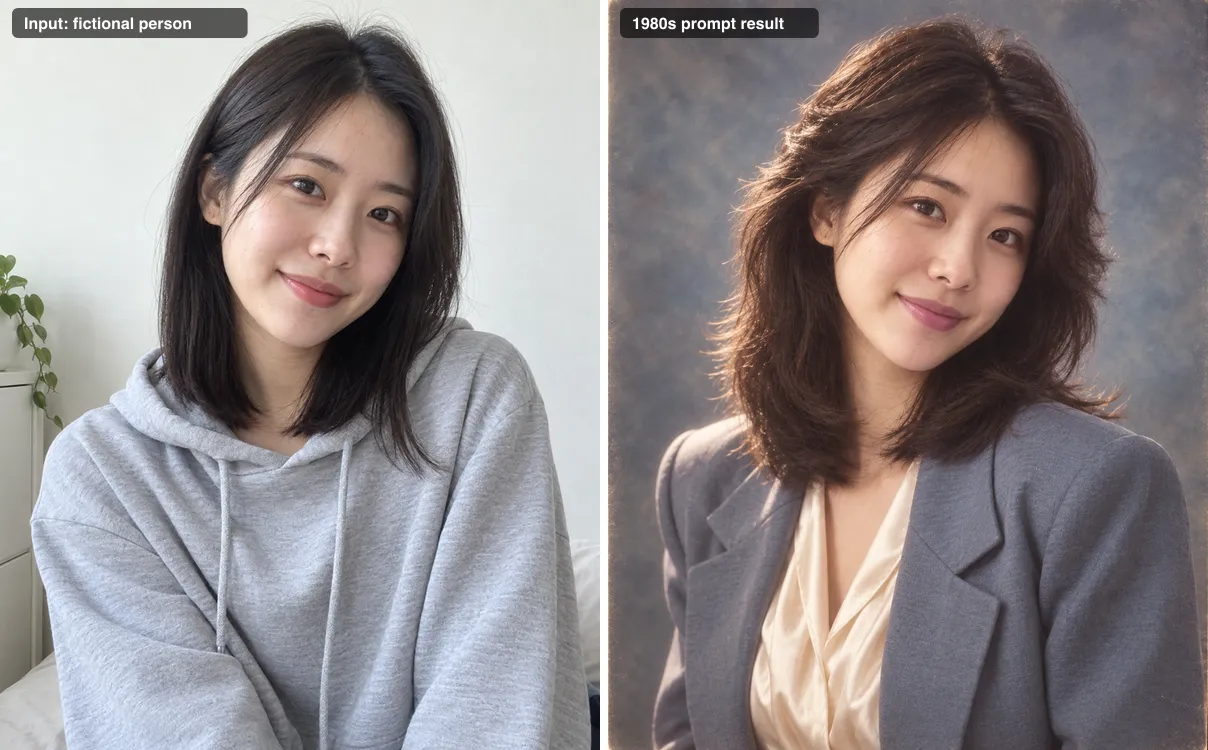
How the examples were made. Every example in this article is a test output from 15 September 2026. We ran each prompt word for word through OpenAI's built-in image generation in Codex, attaching one input portrait per prompt. The input faces are fictional people created with AI for this test. No real customer photos were used. The examples were not produced on the Banana Pro AI workbench, and your results there will differ by model, source photo, and run.
Where the 1980s photo trend is showing up
In September 2026 several prompt roundups appeared around the same idea. Hindustan Times published ten prompts on 9 September covering studio portraits, family albums, and street looks. Times of India followed on 12 September with eleven prompts aimed at retro Bollywood styling. Both focus on ChatGPT and Gemini.
That is enough to show people are looking for these prompts. It does not tell us how large the trend is, where most searches come from, or which look is most popular. This guide covers Indian and Bollywood styling because readers ask for it, alongside American, European, and general 1980s looks.
Quick 1980s style picker
These retro AI photo prompts are grouped by look. Pick the one that matches the photo you already have, then jump to its prompt.
| # | Look | Best source photo |
|---|---|---|
| 1 | Classic 1980s studio portrait | Front-facing head and shoulders |
| 2 | Indian saree studio portrait | Waist-up, face clearly lit |
| 3 | Indian men's retro portrait | Waist-up, neutral expression |
| 4 | Bollywood-style film still | Close-up with defined eyes |
| 5 | Family album snapshot | Relaxed smile, one person |
| 6 | Denim street style | Standing or half-body shot |
| 7 | Neon night portrait | Clear face, any background |
| 8 | High school yearbook photo | Straight-on head and shoulders |
| 9 | Corporate office portrait | Waist-up, formal or neutral |
| 10 | Warm living room photo | Relaxed seated or half-body |
| 11 | Seaside holiday snapshot | Daylight photo with a smile |
| 12 | Black-and-white editorial portrait | Sharp close-up with good light |
How a good 1980s photo prompt is built
The 1980s photo prompts below share one structure. Once you see it, you can write your own 80s photo prompt for any look.
- Identity anchor. Name the uploaded photo as the reference and list what must stay: face, natural skin tone, age, and expression. Without this line many models redraw a new person.
- Era styling. Hair and clothes do most of the work. Shoulder pads, feathered hair, acid-wash denim, silk sarees, and wide collars read as 1980s instantly.
- Setting. A painted studio backdrop, wood paneling, a beige computer terminal, or an arcade tells the story around the face.
- Light and camera. On-camera flash, umbrella lights, fluorescent offices, and point-and-shoot snapshots all look different. Name one.
- Film finish. Grain, faded color casts, and slight softness separate a period photo from a modern photo with an old outfit.
- Exclusions. List what should not appear: smartphones, flat screens, readable logos, and extra text.
Keep one person per image. Group shots make identity much harder to hold, and none of the tests below cover them.
12 1980s photo prompts with test results
1. Classic 1980s studio portrait
The mottled canvas backdrop and umbrella flash are the look people picture first when they think of a 1980s portrait sitting.
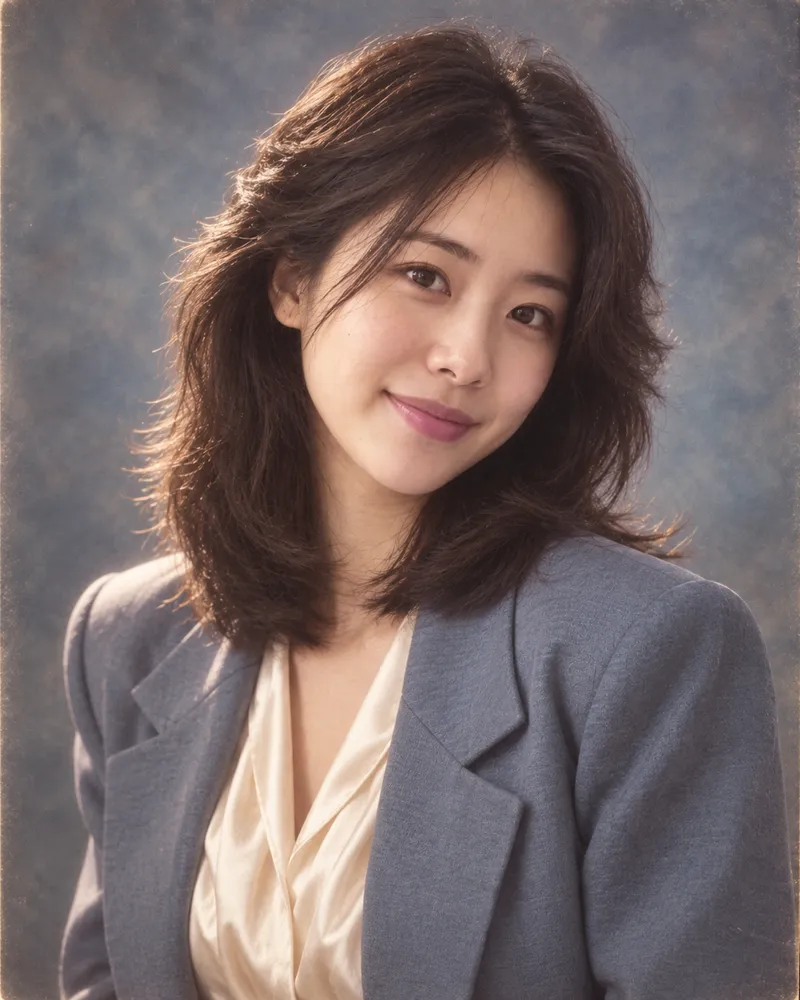
Use the uploaded photo as the identity reference and keep the same face, natural skin tone, age, and expression. Create a classic 1980s photo studio portrait: head-and-shoulders pose turned slightly to one side, mottled blue-gray canvas backdrop, soft umbrella flash with a gentle rim light, voluminous feathered hair, and a satin blouse with shoulder pads or a wide-lapel blazer. Medium-format film look with fine grain, slightly soft focus, and warm faded color. Keep natural skin texture. No modern jewelry, phones, or text.Best for: a clear, front-facing head-and-shoulders photo.
Adjust it: swap "mottled blue-gray" for "brown" or "burgundy" to change the backdrop. If the face looks too soft, replace "slightly soft focus" with "sharp focus on the eyes".
2. Indian saree studio portrait
This look recreates the formal studio portraits found in many 1980s Indian family albums.
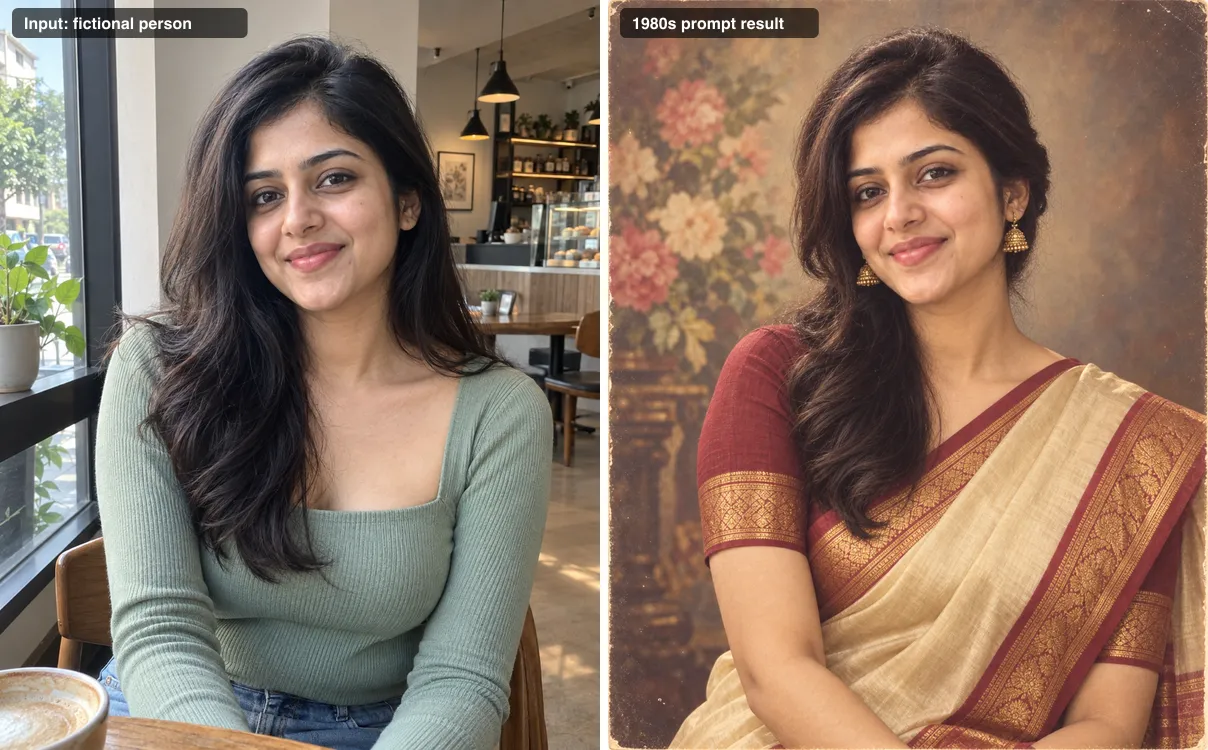
Use the uploaded photo as the identity reference and keep the same face, natural skin tone, age, and expression. Turn it into a 1980s Indian studio portrait: a silk saree with a contrasting woven border, a fitted short-sleeve blouse, hair in soft side-parted waves pinned at the back, and simple gold jhumka earrings. Painted floral studio backdrop, even flash lighting, slight vignette. Scanned color-print look with a warm yellow cast, mild fading, and fine grain. Keep natural skin texture. No modern makeup trends, phones, or text.Best for: waist-up photos where the face is evenly lit.
Adjust it: name the saree you want, such as "a Kanjeevaram silk saree in maroon and gold" or "a chiffon saree with a floral print". Add "a small bindi" or "flowers in the hair" only if they fit the person. In our test the hair stayed loose over one shoulder instead of pinned back, so write "all hair pinned into a low bun" if you want a stricter updo.
3. Indian men's retro portrait
Wide collars, sweater vests, and a volumized side part were a common studio look for men in the 1980s.
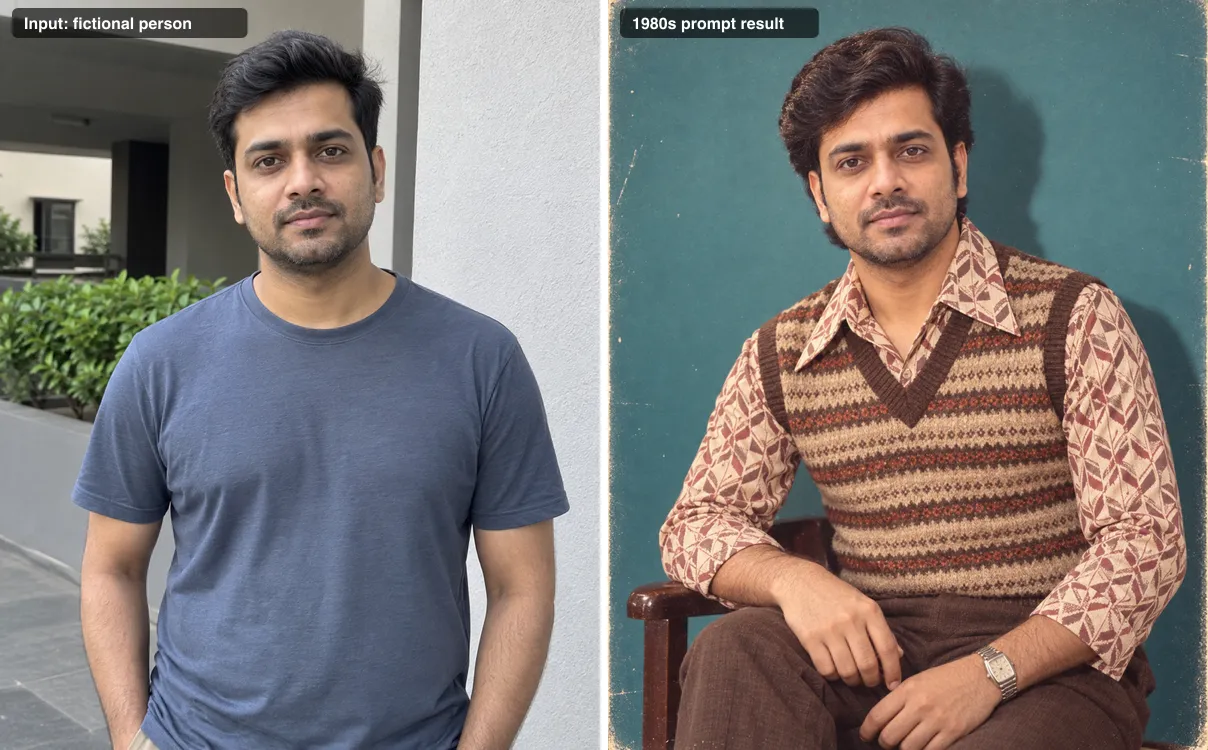
Use the uploaded photo as the identity reference and keep the same face, natural skin tone, age, and expression. Create a 1980s Indian men's portrait: thick side-parted hair with volume, a patterned polyester shirt with a wide collar under a knit sweater vest, and a metal-strap wristwatch. Seated three-quarter pose in a small-town photo studio with a plain teal backdrop. Direct on-camera flash with a crisp shadow behind the subject, color film with warm faded tones and light grain. Keep any facial hair as it is in the photo. No modern haircut, logos, or text.Best for: waist-up photos with a neutral expression.
Adjust it: replace the sweater vest with "a safari suit" or "a white kurta" for a different register. Keep the facial hair line. It stops the model from adding a mustache.
4. Bollywood-style film still
This prompt borrows the lighting and costume language of 1980s Hindi cinema. It creates an original character, not a copy of any actor.
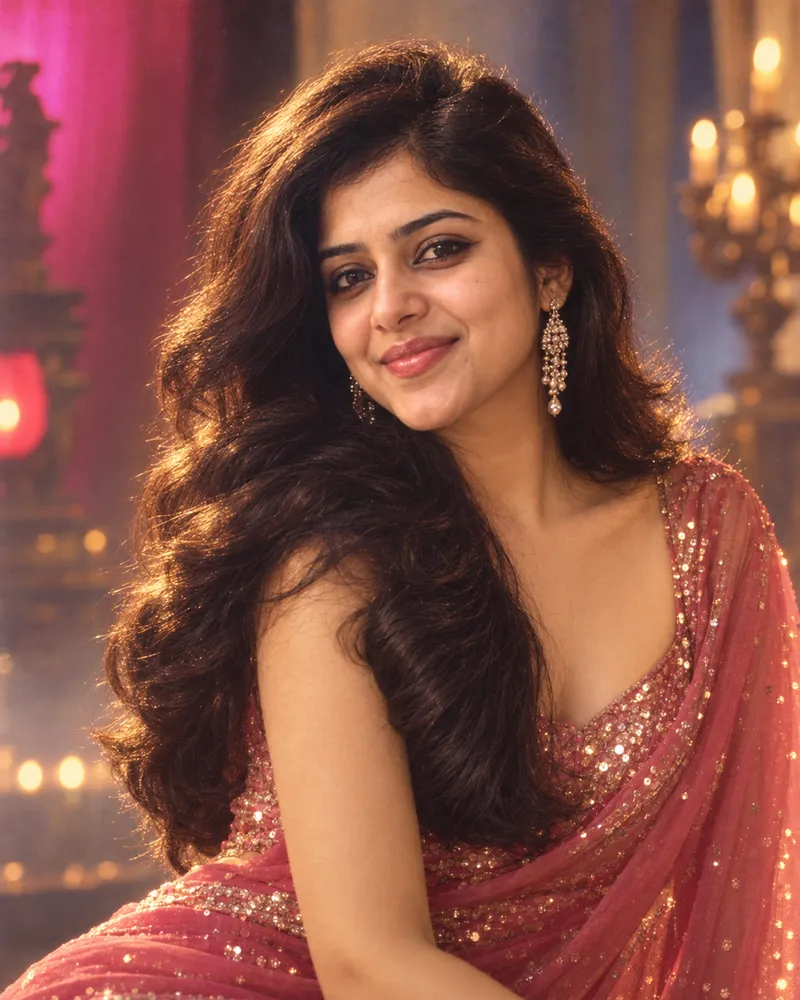
Use the uploaded photo as the identity reference and keep the same face, natural skin tone, age, and expression. Style the person as an original character in a 1980s Hindi film still, not any real actor: dramatic three-quarter close-up, big glossy waves, bold kohl eyeliner, a sequined chiffon outfit, warm tungsten key light, a colored gel glow in the background, and light haze. 35mm cinema film look with visible grain and slightly lifted blacks. Keep natural skin texture. No text, posters, credits, or celebrity likeness.Best for: close-ups where the eyes are sharp.
Adjust it: for a hero look, swap the outfit for "a leather jacket over an open-collar shirt" and drop the eyeliner. Do not name a real actor or film. It invites a lookalike and can raise publicity-rights problems.
5. Family album snapshot
The flash, faded magenta cast, and orange date stamp come from consumer point-and-shoot cameras.
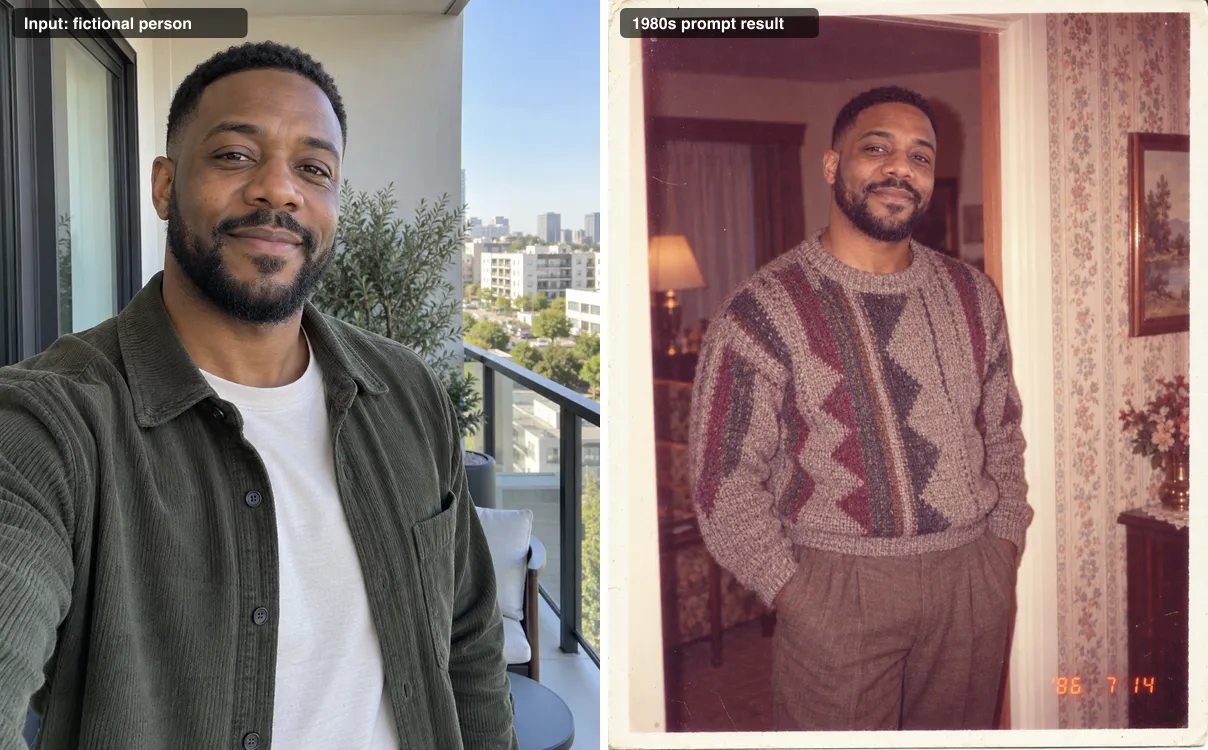
Use the uploaded photo as the identity reference and keep the same face, natural skin tone, age, and expression. Make it look like a snapshot from a 1980s family photo album: the person stands alone in a living room doorway with patterned wallpaper, wearing a knit sweater and relaxed trousers. Point-and-shoot flash, faded warm color with a slight magenta cast, soft focus, a white print border, and an orange date stamp in the lower right corner that reads '86 7 14. Only one person in the frame. No modern objects.Best for: relaxed photos with a natural smile.
Adjust it: change the date digits to a year that means something to you. If the stamp comes out garbled, remove the date line and add it later in a photo editor.
6. Denim street style
Acid-wash denim, teased hair, and saturated slide film give a 1980s city-sidewalk look.
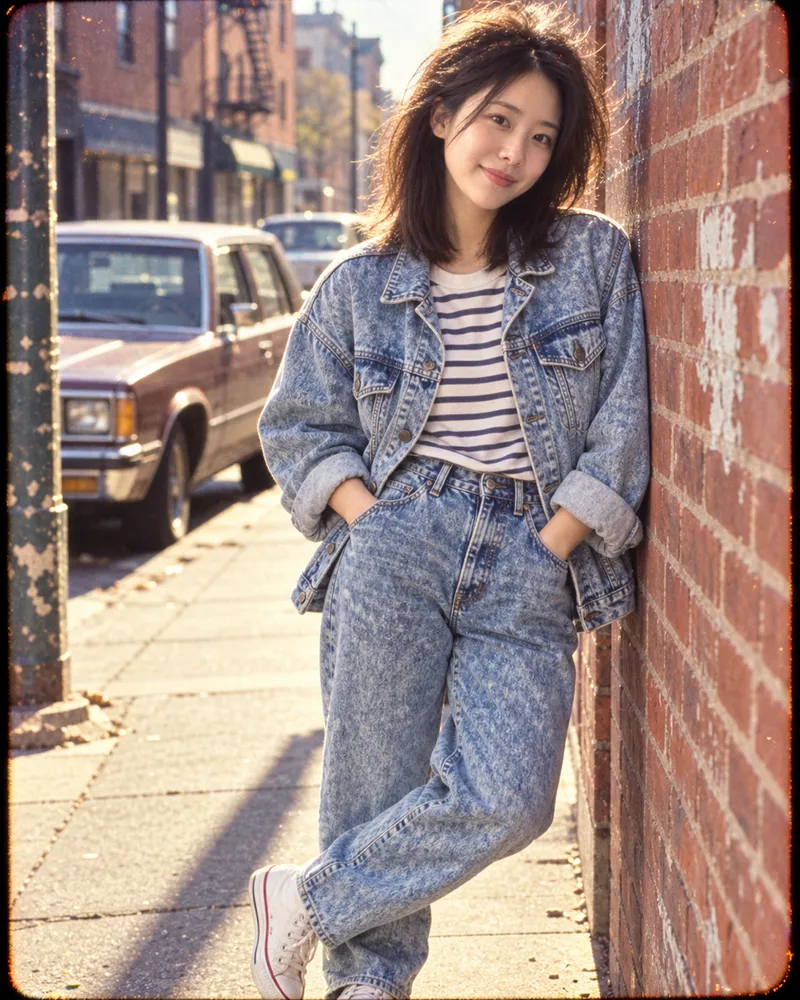
Use the uploaded photo as the identity reference and keep the same face, natural skin tone, age, and expression. Create a 1980s street style photo: an oversized acid-wash denim jacket, high-waisted jeans, a striped tee, white canvas sneakers, and teased hair. The person leans against a brick wall on a city sidewalk with a boxy vintage car blurred behind. Harsh daylight, saturated color slide film look, grain, slight vignette. No modern cars, smartphones, readable brand logos, or text.Best for: standing or half-body photos.
Adjust it: if the source is a close-up, replace the full outfit with "an acid-wash denim jacket" and "a waist-up crop" so the model does not invent a body.
7. Neon night portrait
Pink and cyan neon on wet pavement is the most stylized look in this list, and one of the easiest to recognize.
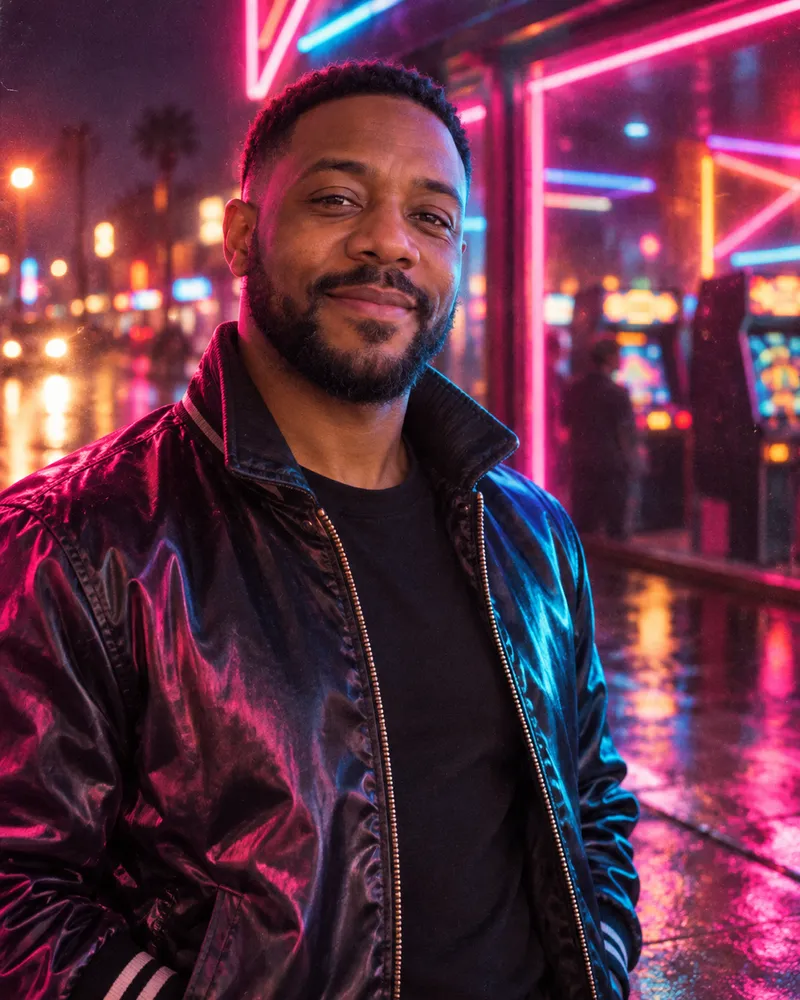
Use the uploaded photo as the identity reference and keep the same face, natural skin tone, age, and expression. Create a 1980s neon night portrait: the person stands outside an arcade at night, lit from the side by pink and cyan neon, with wet pavement reflecting the color. Outfit: a satin bomber jacket with the collar turned up. Shot on high-speed color film, heavy grain, gentle halation around the lights, slight blur in the background. Keep neon signs abstract with no readable words. No LED screens or phones.Best for: any photo with a clear, well-lit face.
Adjust it: strong colored light can change how skin tone reads. If that happens, add "keep the true skin tone visible under the neon". Our result kept small blurred people in the background after three tries. Add "an empty street with no other people" if you want the subject alone.
8. High school yearbook photo
The laser-beam backdrop and pastel sweater point directly at American school portraits from the decade.
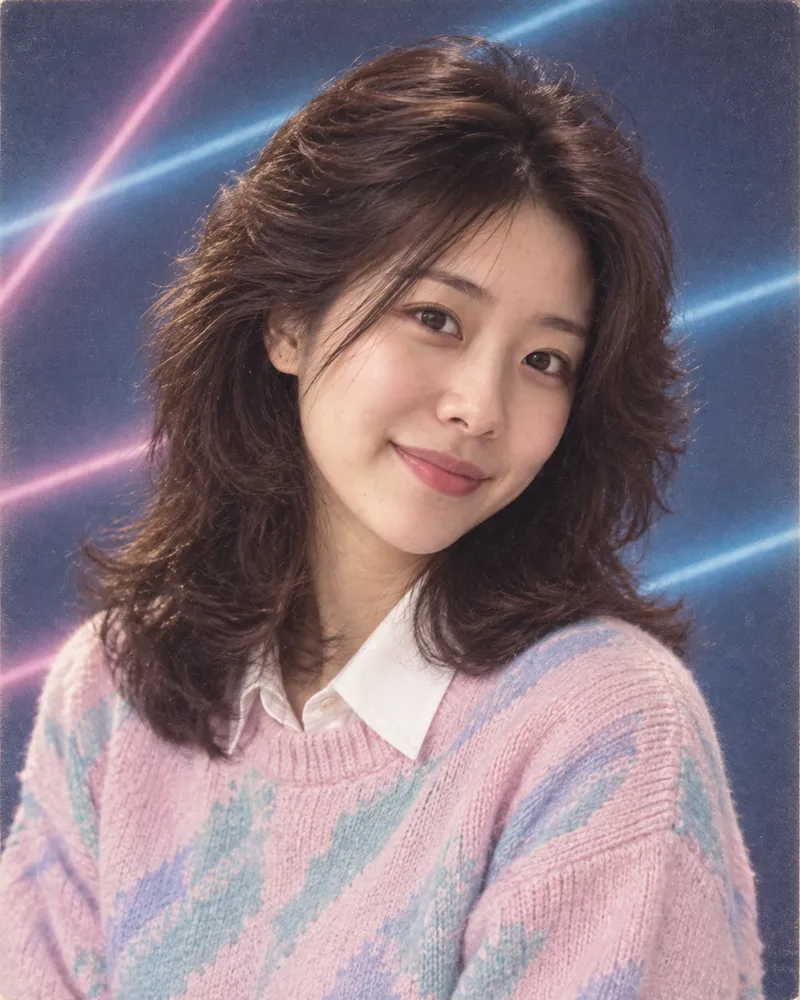
Use the uploaded photo as the identity reference and keep the same face, natural skin tone, age, and expression. Create a 1980s American high school yearbook photo: head-and-shoulders, body angled with the face toward the camera, a blue laser-beam studio backdrop, big feathered hair, and a pastel sweater over a collared shirt. Soft even studio flash, slight softness, printed-page color with fine texture. Keep the original expression. No text, names, or school logos.Best for: straight-on head-and-shoulders photos.
Adjust it: use a photo of an adult as your reference. The prompt keeps the original age, so it will not make anyone look like a teenager.
9. Corporate office portrait
A beige computer terminal and fluorescent light build a 1980s workplace without any costume drama.
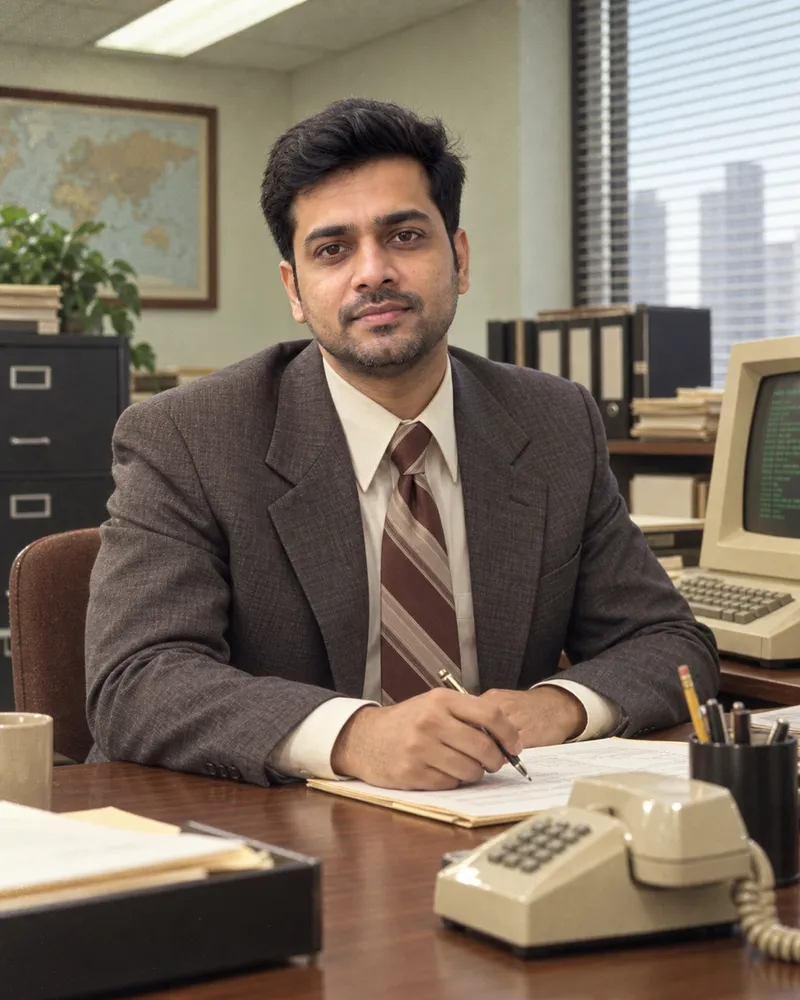
Use the uploaded photo as the identity reference and keep the same face, natural skin tone, age, and expression. Create a 1980s corporate office portrait: the person sits at a wooden desk with a beige computer terminal, a push-button desk phone, and paper files. Outfit: a boxy suit with shoulder pads and a wide tie, or a bow-neck blouse. Fluorescent overhead light mixed with window light, slightly green-tinted color film, fine grain, 35mm lens at eye level. No flat screens, laptops, smartphones, or readable text on the terminal.Best for: waist-up photos with a formal or neutral expression.
Adjust it: pick one outfit instead of leaving "or" in the prompt if you want a predictable result.
10. Warm living room photo
Wood paneling, a velvet sofa, and a tube TV make a cozy at-home snapshot.
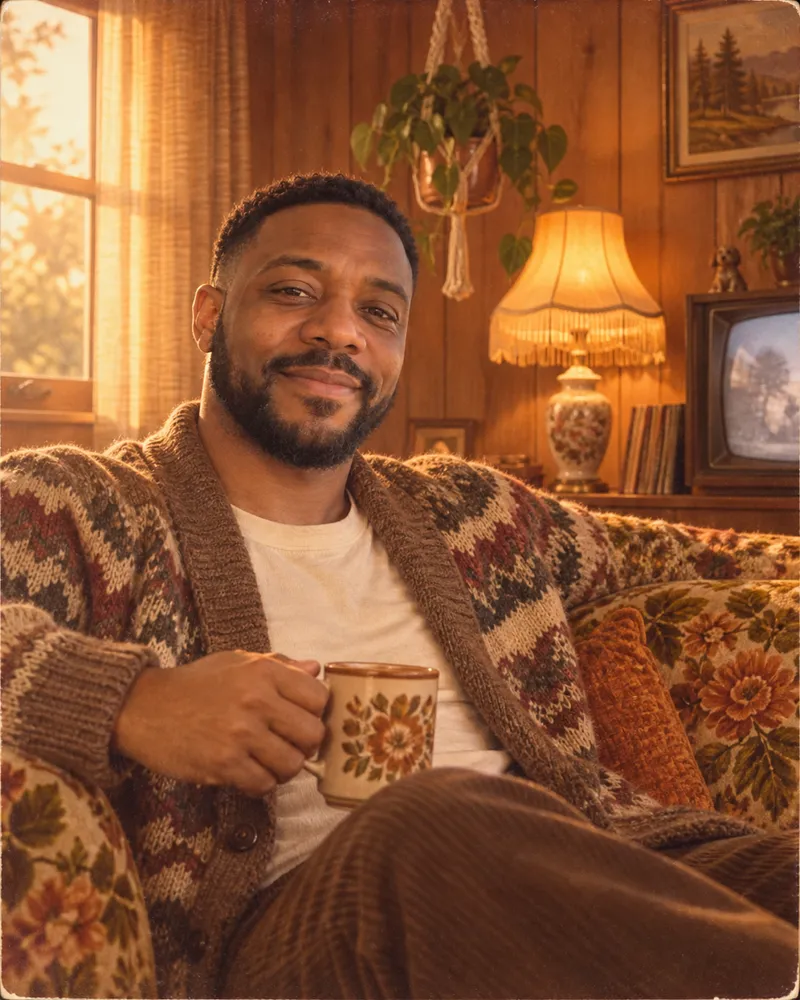
Use the uploaded photo as the identity reference and keep the same face, natural skin tone, age, and expression. Create a warm 1980s at-home photo: the person relaxes on a floral velvet sofa in a wood-paneled living room with a tube TV, a plant in a macrame hanger, and a lamp with a fringed shade. Outfit: a chunky cardigan. Late-afternoon window light with orange lamp fill, soft focus, a warm faded color print with light grain and slight corner vignette. No flat-screen TV, modern gadgets, or text.Best for: relaxed seated or half-body photos.
Adjust it: swap the sofa and paneling for "a sunlit balcony with cane chairs" for a different regional home.
11. Seaside holiday snapshot
Overexposed sun, bright windbreakers, and tilted framing look like a disposable camera on vacation.
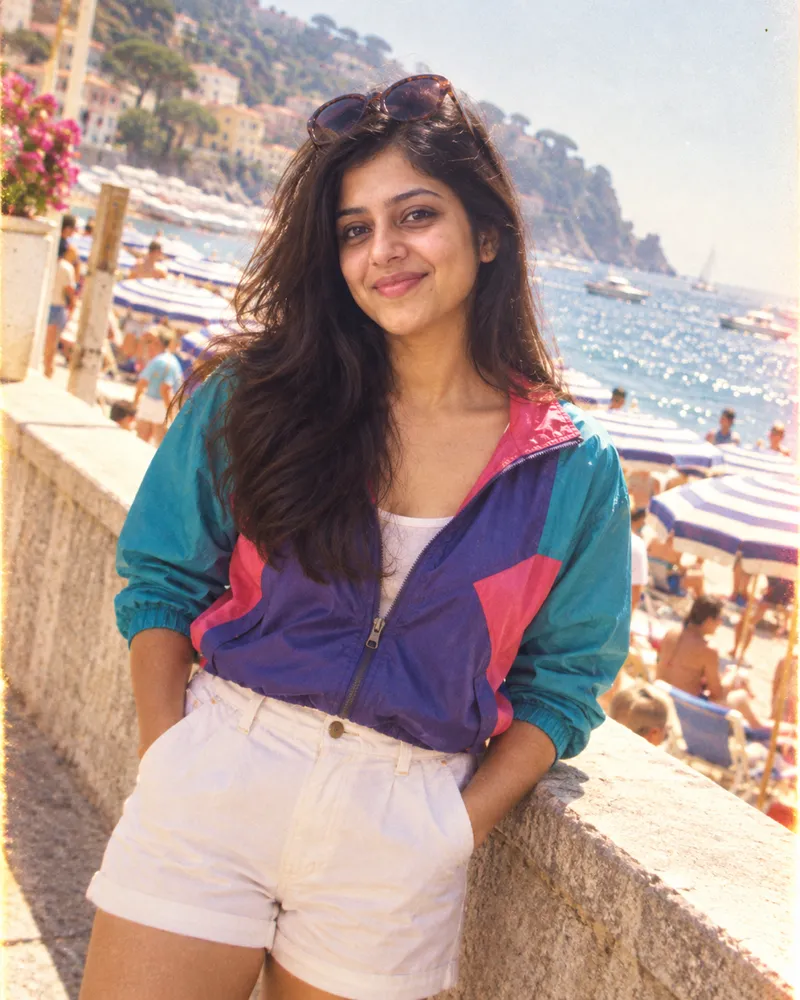
Use the uploaded photo as the identity reference and keep the same face, natural skin tone, age, and expression. Create a 1980s seaside holiday snapshot: the person stands on a sunny beach promenade with striped umbrellas and a hazy sea behind, wearing a color-blocked windbreaker and white shorts, with big sunglasses pushed up on the head. Bright midday sun, slightly overexposed highlights, saturated consumer color film, visible grain, slightly tilted framing like a disposable camera. No modern swimwear, phones, or readable signs.Best for: daylight photos with a smile.
Adjust it: replace "beach promenade" with "a hill station viewpoint with pine trees" for a mountain holiday version. Our test kept a crowd of distant beachgoers in all three attempts. Add "a quiet, empty promenade with no other people" if you want fewer bystanders.
12. Black-and-white editorial portrait
This is the quietest look in the set. It relies on light and grain instead of costume.
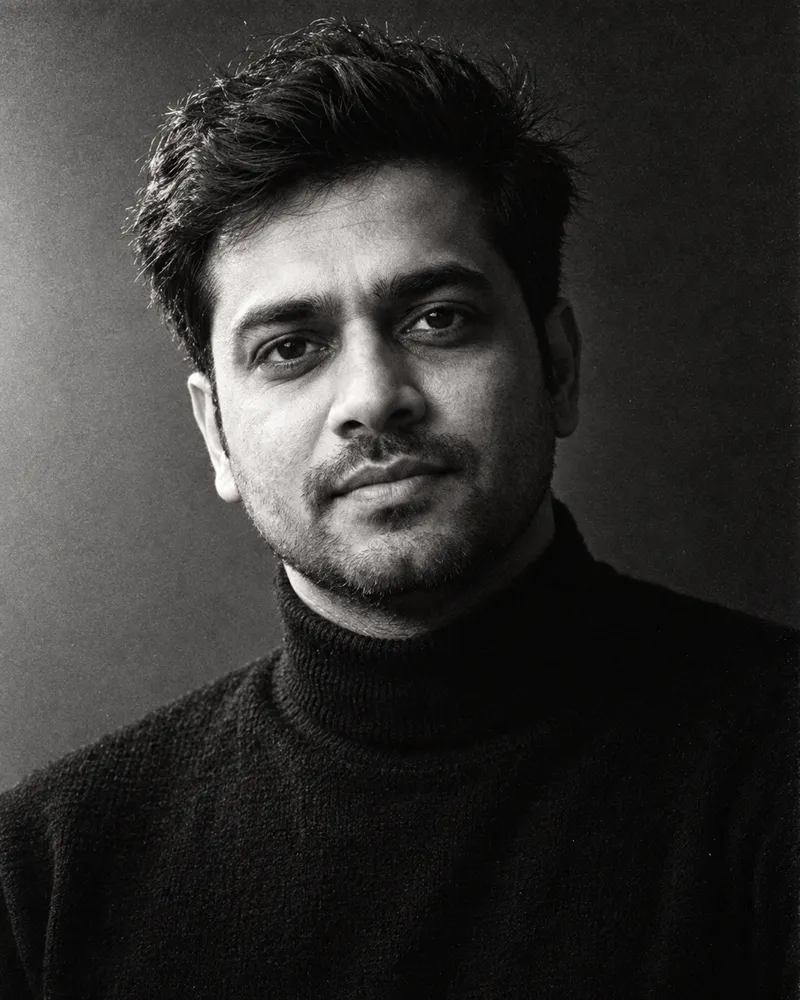
Use the uploaded photo as the identity reference and keep the same face, natural skin tone, age, and expression. Create a black-and-white 1980s magazine editorial portrait: tight crop from the chest up, strong side light from a large softbox, deep shadow on one side of the face, a dark turtleneck, and tousled hair. High-speed black-and-white film grain, rich contrast, sharp eyes. Keep skin pores and fine lines visible. No color, no text, no magazine masthead.Best for: sharp close-ups with good light on the face.
Adjust it: for a softer print, change "rich contrast" to "gentle contrast" and "deep shadow" to "soft shadow".
How to use a 1980s photo prompt in Banana Pro AI
The AI Image Editor takes one source photo and a written instruction, so every prompt above can be pasted into it as it is. It runs on GPT Image 2.
- Choose a photo you have the right to use. Use your own photo, or one where the person has agreed. A clear, single-person photo in even light works best.
- Sign in and open AI Image Editor. Upload the photo as the source image. The editor accepts JPG, PNG, or WebP files up to 20 MB.
- Copy a prompt. Use the copy button on any prompt block above, then paste it into the edit instruction box.
- Pick the output settings. A 4:5 or 3:4 portrait ratio suits most of these looks. Resolution changes the price: 1K costs 20 credits, and 2K or 4K costs 40 credits. Check the credit line on the button before you generate.
- Generate and compare. Drag the before-and-after seam across the eyes, nose, mouth, and hairline. If the person no longer looks like themselves, use the fixes below and run it again.
- Download the version you want to keep.
If you prefer to choose the model, the AI Image Generator also accepts a reference image and lets you pick among image-editing models. The examples in this article were not made with either tool, so treat them as a guide to the style rather than a preview of an exact result.
This is different from repairing a real old print. If you want to fix scratches and fading on an actual photo from the 1980s, use Photo Restoration instead. For a lighter instant-camera finish on a modern photo, try the Polaroid Filter.
Common problems and prompt fixes
The face turned into someone else. Move the identity line to the start of the prompt if you edited it, and add: "Do not change the face shape, eye shape, nose, lips, or jawline." Use a sharper, front-facing source photo. No model can promise a perfect likeness, so compare before you share.
The skin looks airbrushed or plastic. Add "keep visible skin pores, fine lines, and natural texture; no beauty retouching". Remove words like "glamorous", "flawless", or "glossy skin".
The clothes still look modern. Name specific garments instead of "80s outfit": shoulder pads, acid-wash denim, a wide collar, a sweater vest, or a silk saree with a woven border. Add "no current fashion, sneakers, or athleisure" if needed.
The background looks like today. Describe the room or street object by object, then exclude modern items: "no flat screens, smartphones, LED lights, or modern cars".
The grain or fading is too strong. Change "heavy grain" to "fine grain" and "faded" to "slightly faded". If faces lose detail, add "sharp eyes".
Skin tone, gender, or age changed. Keep "natural skin tone, age" in the identity line and avoid lighting words that recolor skin, such as strong colored gels, unless you add "keep the true skin tone visible".
FAQ
How do I keep my face the same in a 1980s AI photo? Start with a clear, well-lit photo of one person and keep the identity line at the start of the prompt. Change clothes and setting, not facial features. Results still vary between runs, so compare the output with your original before you use it.
Do I need to upload a photo? Yes, if you want the result to look like a specific person. Without a source photo the model invents a new face. Only upload photos you own or have permission to use.
Can I use a 1980s photo prompt in ChatGPT or Gemini? You can try them. They are plain-language instructions that do not depend on any one tool. We have not tested them in ChatGPT or Gemini, so we cannot say how closely those results will match the examples here.
How do I make an Indian retro look from the 1980s? Start with prompt 2, 3, or 4. Name specific garments and settings, such as a Kanjeevaram silk saree, a safari suit, or a painted studio backdrop, and keep the skin tone line in place.
Is a 1980s AI photo a real historical photograph? No. It is a new image styled to look like the decade. Do not present it as a genuine archival photo, and label it as AI-generated when you share it where that matters.
Can I make a 1980s family photo with several people? These prompts are written and tested for one person. Multi-person images make each face harder to keep accurate, so start with single portraits.
Try a 1980s look on your own photo
Pick the look that fits your photo, copy the prompt, and run it in AI Image Editor. Start at 1K to test the style before you spend credits on a larger file.
