
A practical place for Flare
Use Flare to explore alternate art directions, draft social images or test composition before committing to a campaign. Keep your brief and dimensions consistent when comparing variations.
Flare + Sunburst · Create + Edit
Turn a brief into a campaign, refine a product photo, or describe a focused edit. Explore Images 2.5 with two model variants in one creative workspace.
Fixed credits shown before submission, based on resolution and references. Failed tasks are refunded. Closing this page does not cancel generation.
Create your first image, combine references, or describe a focused edit. Your results appear here.
Reviewed September 9, 2026 · By Banana Pro AI
GPT Image 2.5 is OpenAI’s image model family for creating images from text and revising existing pictures. OpenAI introduced the corresponding ChatGPT Images 2.5 experience on September 8, 2026. The API offers Flare for general creative work and Sunburst for workflows that prioritize fine detail and editing control. Read the official announcement.
Here, you can use both variants without writing an API integration. Start with a prompt, or switch to Edit images and upload your references. The relevant question is how well an output fits your brief: product shape, exact wording, lighting and the details that must survive an edit.
Use Flare to explore alternate art directions, draft social images or test composition before committing to a campaign. Keep your brief and dimensions consistent when comparing variations.
Choose Sunburst when product detail or edit preservation carries more value than fast iteration. Check subtle textures, small text and the elements outside your selected area.
Name the main image, explain each reference and state what must stay unchanged. For a local revision, identify the area and specify the desired replacement in plain language.
These original AI-generated illustrations show the briefs you can try. They were made for this guide with Codex image generation; they are not benchmark results or verified model outputs.
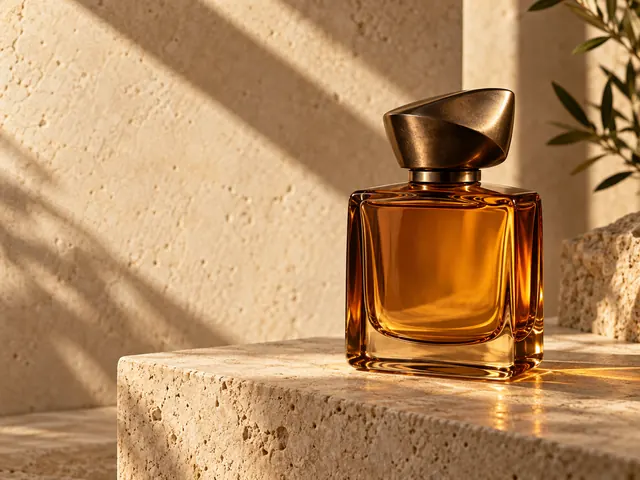
Creative brief 01
Build a product brief around material, lighting and the intended sales channel. Describe an amber glass bottle, a warm stone surface and generous space for a headline. For your own product, upload a reference and ask the editor to preserve its shape and label.
An amber glass perfume bottle on warm limestone, sculptural afternoon shadows, refined still-life photography, no text or logos.
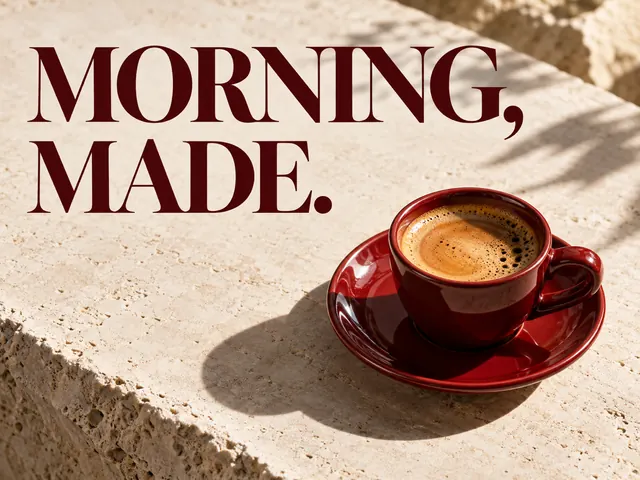
Creative brief 02
Give the exact words in quotation marks and specify their hierarchy. Keep the main message short, then inspect spelling at full size before publishing. For a real promotion, add prices and legal copy in your design software after checking the visual.
A red espresso cup on ivory stone, editorial campaign poster. Exact headline: “MORNING, MADE.” No other words.

Creative brief 03
Upload a room photograph and identify the chair you want to change in your prompt. Ask for rust velvet upholstery while retaining the camera angle, floor and daylight. Describe the intended area clearly; always compare the finished image with the source for unintended changes.
Change only the chair upholstery to rust velvet. Preserve the room layout, daylight, camera angle and other furniture.
Choose around the cost of a revision in your workflow. Fast exploration, precise editing and a familiar baseline are different priorities. The comparison below summarizes vendor positioning and a practical selection method; it is not a Banana Pro AI performance benchmark.
| Decision | 2.5 Flare | 2.5 Sunburst | GPT Image 2 |
|---|---|---|---|
| Starting point | Everyday concepts and repeated drafts | Premium imagery and fine edits | An existing workflow you already know |
| Main reason to choose | Explore a brief efficiently | Prioritize intricate details and edit control | Compare against an established baseline |
| Before approving a result | Check text, shape and composition | Inspect fine details and unchanged areas | Compare the same brief with 2.5 |
| On Banana Pro AI | Generate and reference-based edits | Generate and reference-based edits | Separate GPT Image 2 workspace |
| Buying decision | Start here for routine creative work | Use when revision quality matters most | Keep if your existing results meet the brief |
For a useful trial, run one real product brief with the same aspect ratio and resolution. Count usable outputs and manual corrections, then decide whether the difference justifies your credits. Compare with GPT Image 2 or explore Nano Banana 3 for a different model workflow.
Choose Flare or Sunburst, then describe the subject, framing, material, light and intended use. Put exact words in quotation marks and say what must not appear.
Choose aspect ratio and resolution. In Edit mode, upload the target and supporting references, then describe their roles and the change you want. Review the whole result for unintended changes.
Check the displayed credits, submit and wait for the saved task. Download your result or choose Edit this to use it as the next reference. Inspect text, transparency and preserved details before publication.
Select an aspect ratio and 1K, 2K or 4K. Start with a smaller output to check the composition, then request a higher resolution when fine detail matters. Edit mode accepts up to 16 references with written instructions. Mask painting, custom pixel sizes, quality tiers and output-format controls are not available in this workspace.
Each request costs 20 credits at 1K, 80 at 2K or 320 at 4K, plus 5 credits per reference image. Both variants use the same storefront price. Failed tasks are refunded through the task system. Closing the page does not cancel an accepted request.
These credits are Banana Pro AI service prices, not a conversion of any provider invoice.
GPT Image 2.5 is the image generation and editing model family behind ChatGPT Images 2.5, announced by OpenAI on September 8, 2026. Its API variants are Flare and Sunburst. This page offers both variants in one workspace.
Images 2.5 usually refers to the ChatGPT image experience. GPT Image 2.5 names the model family developers access through APIs. The names are related, but ChatGPT interface features and third-party tools can differ.
Start with Flare for everyday concepts and repeated drafts. Choose Sunburst when a campaign or edit needs more attention to intricate detail. Compare the same brief and output settings; neither choice removes the need to inspect the result.
Yes. Edit mode accepts up to 16 uploaded reference images. Put the image you want to change first, then explain the role of every additional reference. Describe the intended changes in your prompt.
Choose an aspect ratio and 1K, 2K or 4K resolution. Those are the controls this workspace exposes for generation and reference-based editing. Output format, transparency and mask controls are not offered here.
Generation uses Banana Pro AI credits and requires sign-in. The tool displays a fixed credit amount for your chosen resolution and reference count before submission. Any account starter credits are subject to the current account offer.
Time varies with the model variant, output settings, request complexity and queue. The workspace shows the saved task status and resumes checking after a connection interruption. Closing the page does not cancel an accepted request.
Review the applicable service terms and ensure you have permission to use uploaded photographs, logos and other reference material. Inspect output for unwanted trademarks, text errors and misleading details before using it in advertising.
This guide uses OpenAI’s release announcement, reviewed September 9, 2026. Model behavior can change; the tool’s current controls describe the options available on this website.
Start with a specific brief, then refine the details that matter.
Try GPT Image 2.5