


A pet photo in the simple coloring-page look
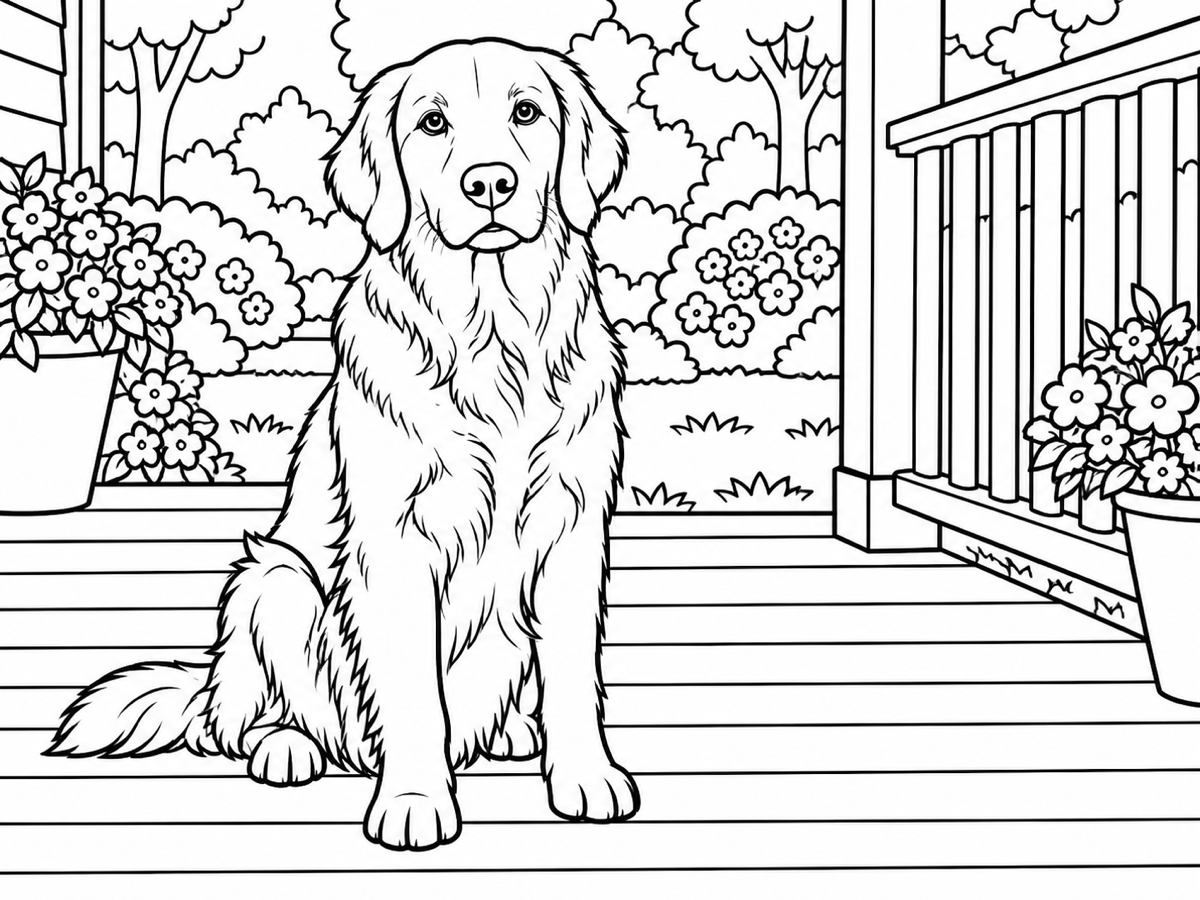
A sitting dog redrawn with thick closed outlines and large white regions for crayons. Ears, collar, and pose stay readable, while fur texture is dropped so the page can be colored instead of shaded.
Turn a photo to coloring page from one upload. Pick simple or rich detail, preview A4 or Letter, then download PNG or PDF.
Coloring page, not a shaded sketch
The brief asks for closed contours and large empty regions on a white sheet. It is not a graphite sketch, not a gray photo filter, and it does not add names or captions to the drawing.
Upload one photo, pick simple or rich detail, then inspect the A4 or Letter sheet before downloading.
JPG, PNG, or WebP, up to 5 MB, 256-4,096 px per side, no more than 16 MP
A4 portrait · 0.5 in margin
Direct answer
A photo to coloring page converter is a tool that redraws one photograph as closed black outlines on a pure white sheet so you can print it and fill the empty regions. Banana Pro AI Photo to Coloring Page does that job in the browser. You upload one JPG, PNG, or WebP, choose simple or rich detail, and inspect an A4 (210 × 297 mm) or US Letter (8.5 × 11 in) portrait preview with a 0.5 in margin before you download PNG or PDF. The drawing is a 1K raster image at the photo's aspect ratio. It is not a vector path file and not a gray photo filter. Names and captions are not added. One run costs 10 credits. Likeness is not guaranteed. Busy scenes, tiny faces, and heavy blur can leave gaps. Check the print preview at full size and keep the original photo.
The Banana Pro AI product team last reviewed this converter on 2026-09-14.
Printable cases
These illustrative, AI-generated examples show simple and rich line art from original source photos. They are not measured outputs or a performance benchmark. Actual results vary, so inspect your own print preview before you keep it.
A sitting dog redrawn with thick closed outlines and large white regions for crayons. Ears, collar, and pose stay readable, while fur texture is dropped so the page can be colored instead of shaded.


A bouquet redrawn with more interior contours and closed petal regions. The arrangement stays in place, gray midtones are removed, and the sheet remains a line drawing rather than a shaded still life.


A hillside view reduced to closed shapes for sky, trees, and path. Fine photographic texture is dropped so each region can take a single crayon or marker fill on a white sheet.
What changes and what stays
A useful photo to coloring page result is a sheet you can print and fill, not a darker copy of the photo. This tool redraws the subject as black line art on white paper and then fits that drawing onto an A4 or Letter portrait sheet with margins.
Simple detail uses thicker contours and fewer interior lines. Rich detail adds more closed regions. Both looks ask the model to avoid grayscale shading and large solid black fills that waste crayon space.
After generation, the drawing is placed on a portrait sheet with a half-inch margin while the subject proportions stay the same. You inspect that print preview before downloading PNG or PDF. The file is a raster sheet, not a vector path file.
Likeness is not guaranteed. Tiny faces, heavy blur, and busy backgrounds can collapse into broken lines. The model may still leave a gray patch or an unclosed gap. Check the print preview at full size and keep the original photo.
The converter generates a new raster drawing from your photo plus a locked coloring-page brief. It does not trace pixels into vector paths and it does not guarantee a press-ready plate. Small features can move. Names, captions, and signatures are not part of the default drawing. When the source is tiny, dark, or heavily compressed, the outline has less to hold on to.
Keep the original file. If a face, paw, or flower region is unusable, discard the result and try a clearer crop or the other detail look. If you want graphite shading instead of empty regions to color, use Photo to Sketch. If you want a finished illustration with color already applied, use AI Illustration Generator.
Upload only photos you have the right and consent to process. Signed-in coloring page tasks and results can appear in My Creations so a task can be recovered after a temporary connection problem instead of being paid for twice.
The current storage backend has no automatic expiry for uploaded or generated image objects. Delete in My Creations calls the authenticated creation-delete endpoint and soft-deletes the task record from account history; it does not delete the underlying image object or provider copy. Review the Privacy Policy and contact support before uploading photos of children or other sensitive portraits.
Start with a sharp photo and a clearly visible subject. Pets, flowers, and simple landscapes convert more cleanly than crowded streets. Crop first if you want the subject larger on the printed sheet.
Choose a JPG, PNG, or WebP file up to 5 MB, with each side from 256 to 4,096 pixels and no more than 16 megapixels. After upload, the workbench reads the stored image dimensions before you can start a conversion.
Simple is the default for large crayon regions. Rich adds more interior contours. Sign in, confirm the fixed cost of 10 credits, and start one tracked job. The result is a 1K line drawing at the same aspect ratio as your photo.
Choose A4 or Letter portrait. The sheet shows a half-inch margin and keeps the subject proportions. Download PNG for a raster print, or PDF for a one-page sheet. Both are client-side layouts of the generated drawing, not a second billed run.
Choose the right drawing workflow
This table compares three approaches people actually use. It is a workflow comparison, not a quality score, and it does not link out to other products.
| Approach | Best for | Control | Tradeoff |
|---|---|---|---|
| Banana Pro AI Photo to Coloring Page | One pet, flower, or landscape photo that needs a printable coloring sheet with A4 or Letter preview | Simple or rich detail, a locked no-text brief, print-margin preview, and PNG or PDF download for 10 credits | Likeness is not guaranteed, busy scenes can fail, the sheet is a raster image, and there is no brush for fixing a broken line |
| General chatbot image prompts | A coloring drawing from a written scene or an attached photo when you do not need a print sheet yet | A chat prompt or an attached photo, with whatever paper size you assemble later in another app | Chat can start from a photo or a written scene. It still does not give this page's A4 or Letter preview with a 0.5 in margin, and there is no tracked coloring-page task |
| Photo editor edge and threshold filters | Editors who already own an image editor and want to posterize, threshold, or find edges on the original pixels | Manual sliders, masks, and layer stacks on the source file | Thresholding a photo often leaves gray patches or solid black blobs. The result is a filtered photo, not a designed coloring page, and there is no one-page print preview |
The workbench accepts one JPG, PNG, or WebP image up to 5 MB. Each side must be between 256 and 4,096 pixels, and the image must stay within 16 megapixels. One run costs 10 credits and returns a 1K line drawing at an automatic aspect ratio. A4 is 210 by 297 mm and Letter is 8.5 by 11 in, both portrait, with a 0.5 in margin. PNG and PDF export the same sheet layout. The file is a raster image, not a vector file.
Processing infers contours the camera never recorded, so the result is an interpretation rather than a trace. By using the tool, you confirm that your upload complies with the Terms of Service. Reviewed by the Banana Pro AI product team · Last reviewed: 2026-09-14.
Questions
Clear answers about printable outlines, ChatGPT, simple versus rich detail, paper sizes, and credits.
Upload one JPG, PNG, or WebP photo, choose simple or rich detail, and generate. Sign in and have 10 credits available. When the drawing appears, pick A4 or Letter, inspect the print preview, then download PNG or PDF.
Simple uses thicker closed outlines and large empty regions, which is the default for kids and crayons. Rich adds more interior contours for adult coloring. Neither look is supposed to keep gray shading or large solid black fills.
ChatGPT can turn a photo you attach in chat into a new line drawing. It does not give you this page's A4 or Letter print preview with a 0.5 in margin, a locked no-text brief, or a tracked coloring-page task in My Creations. For a printable sheet from a photo you already have, use this converter, inspect the preview, then download PNG or PDF.
Yes. The preview is portrait A4 or Letter with a 0.5 in margin, and the subject keeps its proportions inside that area. PNG and PDF use the same sheet. This is a raster layout of a 1K drawing, not a claimed press-ready vector file.
No. The locked brief tells the model not to add names, captions, or signatures. Existing text in the photo can still be misread or dropped, so check the preview if lettering matters.
One run uses 10 credits and returns a single 1K line drawing. Changing A4 or Letter and exporting PNG or PDF does not start a second billed generation. The workbench shows the cost before submission, and the task system avoids paying twice when a connection is interrupted.
Keep drawing
Use the narrowest tool that fits. Sketch when you want shaded marks, illustration when you start from a written scene, or character sheets when you need a designed figure instead of a photo conversion.
Planning several connected scenes instead of converting one photo? Build the full set with the AI Coloring Book Generator.
Start with one clear photo, review the fixed 10-credit cost, and check the A4 or Letter preview before you download.
Open the coloring page workbench