Design packaging concepts for boxes, pouches, bottles, tubes, jars and labels with our AI packaging design tool. Describe the product or upload a logo you own, choose a pack format, a design direction and a presentation, then generate and download a concept image.
ReadyOne 1K image. A visual concept, not a dieline or print-ready file. 20 credits
Optional product photo or logo
Optional: one image you own, up to 5 MB. A logo or existing pack keeps its artwork recognizable. A written brief is still required.
Account required · one new charge for each regeneration
Packaging concept preview
Turn a product brief into a pack
Choose a pack format, a design direction and a presentation, then generate your own concept.
Find, download, or delete completed runs in My Creations. Open My Creations
20 credits per 1K image · Account required · One optional JPG, PNG or WebP reference, up to 5 MB · Visual concepts only
Packaging directions you can brief today
AI packaging design examples for ecommerce brands
A useful brief names the product, the pack format and the details that make the brand recognizable. These three concepts cover a skincare set, a food pouch and a subscription box, and each one is reproducible with the controls in the workbench above.
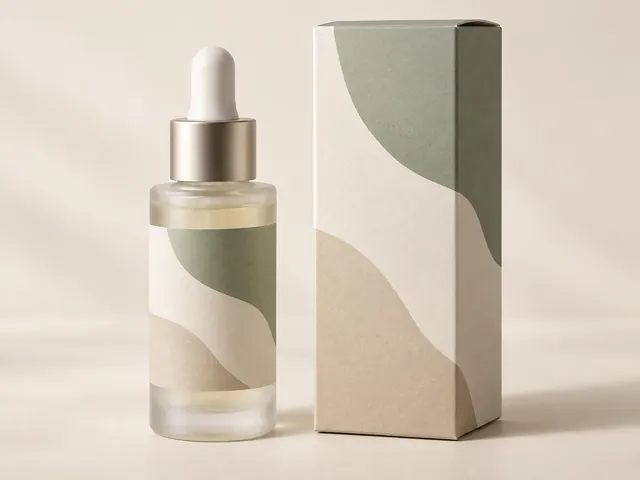
Skincare bottle and carton set
Show a matched set so the bottle and its carton read as one product line. A restrained two-color palette keeps small type areas believable under studio light.
Read the creative brief
A coordinated skincare set: a frosted glass serum bottle with a wrap label and a slim folding carton. Minimal design, warm cream and sage palette, soft-touch matte board, studio hero on a seamless backdrop.
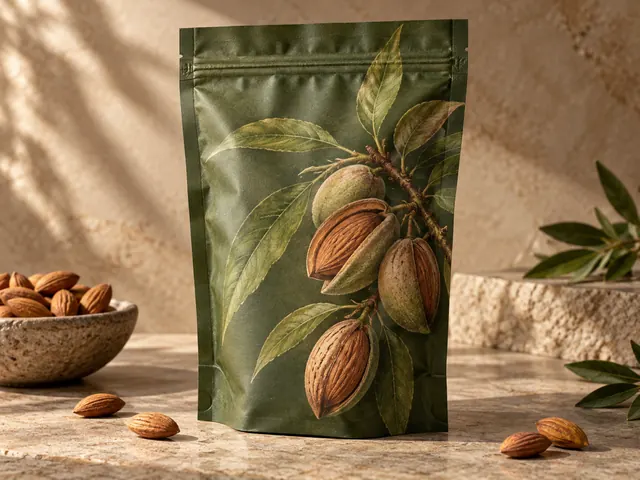
Food pouch packaging
Pouches hide their structure in the seams and gusset. Ask for a visible gusset and clean crimp so the flexible format is obvious instead of looking like a flat card.
Read the creative brief
A matte stand-up pouch for roasted almonds: deep olive body, oversized illustrated almond branch, matte film with a subtle paper texture, product-family presentation on a stone surface.
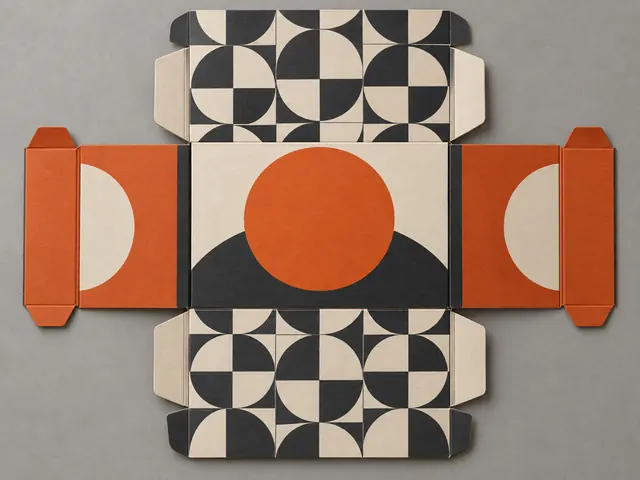
Subscription box flat layout
A flat layout is a fast way to explore artwork across panels before deciding which face carries the brand mark. Keep the wording abstract and confirm every panel after export.
Read the creative brief
A monthly subscription box shown as a flat overhead layout: unfolded panels, a repeat pattern across the interior, and a bold retail direction with high-contrast color blocks on the lid.
What is AI packaging design?
AI packaging design is the practice of generating a product pack visual from a written description, a reference image, or both. It replaces the slow first round of a packaging project, where a team sketches several directions before committing budget to photography or print.
Banana Pro AI focuses on the packaging decisions that buyers actually compare: the structure of the pack, the design direction of the artwork, and the way the product is presented. Instead of a generic image box, the workbench asks for a pack format and a presentation, then writes a detailed art-direction prompt for you.
Structure-first briefs
Choose folding carton, stand-up pouch, bottle and label, cosmetic tube, jar and lid, or a flat bottle-label concept. The format shapes the seams, creases and reflections, so the concept reads as the pack you asked for.
Original artwork only
The prompt forbids copying retail packaging, competitor marks and franchise artwork, and it avoids inventing net weights, certifications or legal copy that you would have to remove later.
Optional owned reference
Attach one logo or existing pack photo up to 5 MB. The artwork stays recognizable while the model explores new structure and lighting around it.
Download-ready output
Preview the result when polling finishes, download it as PNG, JPEG or WebP, and recover a run from My Creations without paying for a second start.
How to design AI packaging in three steps
Keep one variable per run. Changing the format, the direction and the presentation at the same time makes it hard to see which choice improved the concept.
01
Describe the product and the pack
Write what is inside the pack, who buys it and which pack you need. Name two visual details, such as a botanical line drawing or a color-blocked lid. Twenty to six hundred characters is enough; add a logo if you own one.
02
Choose format, direction and presentation
Set the packaging format so seams, creases and caps are correct, pick a design direction for the artwork, and decide whether you want a studio hero, a coordinated product family or a flat layout of the panels.
03
Generate, review and refine
Generate one concept at the displayed credit cost, then check structure, color balance and every character of lettering. Regenerate with one change, or reuse the result as the reference for the next direction. Download the version you want to keep.
AI packaging design tips that save revisions
Match the material words
Say matte, glossy, kraft, frosted glass or soft-touch board. Material words change highlights and texture, which is what makes a pack look manufactured instead of painted.
Protect the panel you care about
Decide whether the front panel, the lid or the label band carries the brand mark, and state that in the brief. A clear focal panel keeps small type away from tight folds and curved edges.
Plan for a real dieline
A concept image is not a production file. Once you approve a direction, rebuild the artwork on the correct dieline and confirm bleed, safe areas and substrate with your printer.
Keep type short
Generated lettering is raster pixels. Short words survive better than long paragraphs, so reserve the exact wording, net weight and legal lines for the final layout.
Explore the family early
Use the product-family presentation to test whether two or three units hold together as a line, which matters for skincare, beverage and food ranges.
Check rights before publishing
Confirm you own or have permission to use every uploaded reference, and review the result for marks or artwork that resembles an existing brand before it goes on a listing.
Banana Pro AI vs insMind vs Kittl for packaging design
Choose by workflow rather than by a promise of a perfect result. This comparison concerns packaging concept images, not print production, and competitor descriptions reflect their public product pages as reviewed in September 2026.
Compare three approaches to AI packaging design
Tool
Best fit
How you guide it
Trade-off
Banana Pro AI
Packaging concepts that must match a chosen structure, direction and presentation
Written brief plus one optional owned logo or product photo; pack format, design direction and presentation are explicit controls
20 credits for one 1K concept image; lettering is rendered as pixels and needs a proofread.
insMind
Exploring several visual effects from a single image
Its public packaging page presents a general prompt, model and aspect-ratio box rather than pack-specific fields
Confirm the current effect, credit terms and export options for the pack you plan to show.
Kittl
Template-led layout editing for print graphics
Its toolkit emphasizes editable templates and typography for finished artwork
Templates still need manual layout work; check terms before commercial publishing.
Banana Pro AI keeps the pack-specific controls visible: format, direction, presentation and image shape all change the generated concept, and an optional owned reference keeps your own artwork in the frame. That structure-first approach is what separates a packaging concept from a generic AI picture.
AI packaging design FAQ
What is AI packaging design?
AI packaging design turns a written product brief or an owned reference image into a visual concept for a box, pouch, bottle, tube, jar or label. Banana Pro AI lets you choose the pack format, the design direction and the presentation, then returns a downloadable image that you can present, test or hand to a designer.
How do I create a packaging design with this tool?
Describe the product, the pack structure and two defining visual details in twenty to six hundred characters. Choose a format such as folding carton or stand-up pouch, pick a design direction, set the presentation and image shape, then generate. If you already own a logo or an existing pack photo, upload it so the concept keeps your artwork recognizable.
Can I upload my own logo or product photo?
Yes. One optional JPG, PNG or WebP file up to 5 MB can be attached, and it is validated against your account before use. The brief still drives the concept; the reference steers the brand artwork and colors. Do not upload artwork you do not have the rights to use.
What files do I get from an AI packaging design?
Each run returns one high-resolution 1K raster image that you can preview and download as PNG, JPEG or WebP. It is a visual concept for presentations, listings and design reviews. It is not a dieline, CAD file, print-ready PDF or editable vector, so a designer must still build the production artwork and confirm dimensions and tolerances.
How much does one packaging concept cost?
Generating one 1K packaging concept costs 20 site credits and requires an account. Every regeneration is a new paid request, and the workbench shows your balance before you submit. A failed task follows the site credit-refund flow, and a restored run keeps the same task and the same single charge.
Will the brand name on the pack be spelled correctly?
Packaging concepts are raster images, so any brand name, net weight or legal line is drawn as pixels rather than set as editable text. Short words often survive, but you should proofread every character and expect to add final lettering in a layout tool. Supply a clear description and check the result before publishing.
Can I show packaging for any product category?
You can describe food, skincare, beverage, pet, home or gift products. Describe an original design and avoid copying competitor packaging, franchise artwork or protected marks. The safety check rejects briefs and references that appear to reproduce someone else’s brand.