Turn an idea or photo into an original collectible-style image with our AI Toy Generator. Choose vinyl, plush or clay, set the scene, and give your character a miniature world.
ReadyOne 1K image. A visual concept, not a 3D model or manufacturing file. 10 credits
Optional reference
Optional: one image you own, up to 5 MB. Keep the main subject clear. A description is still required.
Account required · one new charge for each regeneration
Toy concept preview
Your next collectible starts here
Choose a material and presentation, then create your own toy image.
Find, download, or delete completed runs in My Creations. Open My Creations
10 credits per 1K image · Account required · One optional JPG, PNG or WebP reference, up to 5 MB · Digital concepts only
Start with a specific idea
AI Toy Generator ideas: material changes the character
A good brief names the subject, its defining details and the intended presentation. Explore three creative directions, from a smooth vinyl character to a soft mascot and a handmade collectible.
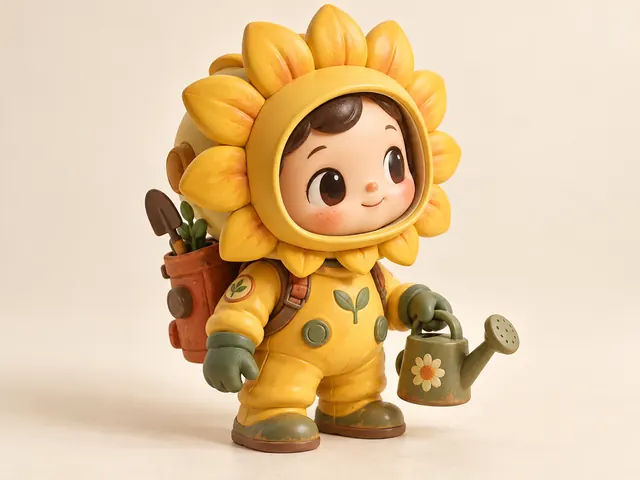
A vinyl character with a story
Give the subject two or three recognizable details. Smooth material and a simple backdrop help a small character read clearly in a social post.
Read the creative brief
A moon gardener with a sunflower helmet, orange backpack and tiny watering can. Smooth vinyl, chibi proportions, studio background.
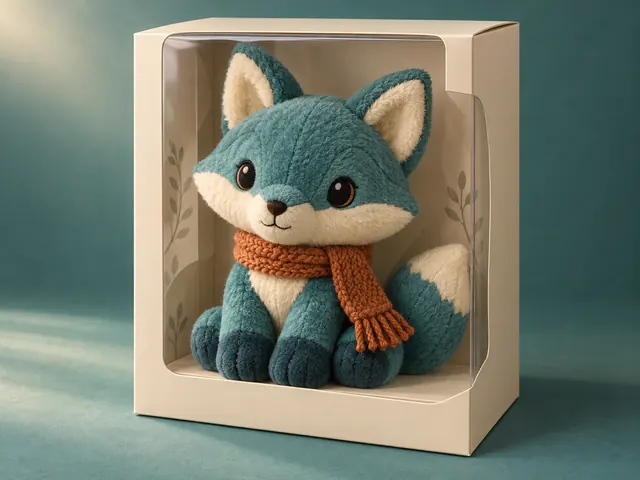
A soft mascot in a display box
Use fabric, seams and embroidery to describe softness. Keep packaging original and check that the box does not obscure the mascot.
Read the creative brief
An original teal fox mascot with cream ears and a rust scarf. Soft plush, balanced proportions, plain window display box, no text.
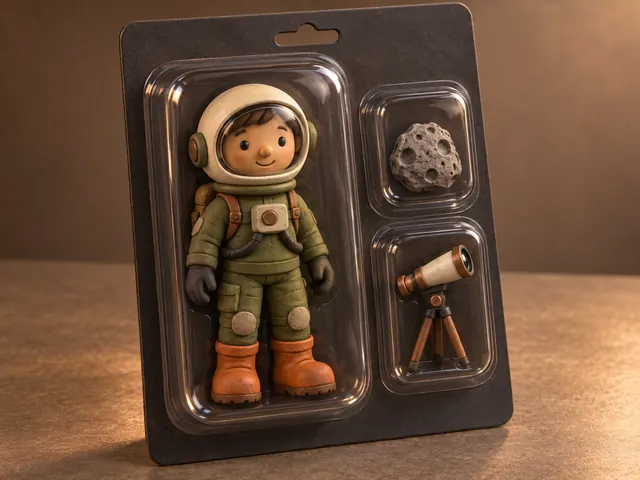
A handmade collectible concept
Name only the accessories that matter. Inspect small parts and reflections before using a packaging concept in a presentation.
Read the creative brief
A clay space explorer with a rounded cream helmet, moss-green suit and orange boots. Natural proportions, plain blister pack with a rock and a telescope.
From a character idea to a toy image
Use the image to explore a mascot, tell a story or present a collectible concept before committing to production design.
01
Describe the subject
Name its silhouette, colors and one or two accessories. For a photo transformation, upload a reference you own and describe the features to preserve.
02
Choose the material and stage
Vinyl suggests a smooth collectible; plush emphasizes softness; clay adds a handmade feel. Start in a studio, then try packaging when you are happy with the character.
03
Generate, inspect and refine
Check the output against your brief or source. Adjust the description or presets and regenerate at the displayed credit cost. Download the version you want to keep.
Banana Pro AI vs insMind vs Pixelcut
Choose by workflow rather than a promise of a perfect result. This comparison concerns toy-image concepts, not physical toy manufacturing. Competitor capabilities reflect their published product descriptions reviewed September 16, 2026.
Compare three approaches to AI toy images
Tool
Best fit
How you guide it
Trade-off to consider
Banana Pro AI
An original character with explicit material and packaging choices
Text or one owned reference; material, presentation and proportion presets
10 credits for each 1K result; inspect likeness and packaging details.
insMind
Exploring a range of toy and character effects
Its toy page describes text/photo input and several toy-style filters
Check the selected effect and current credit terms for your intended use.
Pixelcut
Prompt-led brainstorming of toy concepts
Its toy generator describes creating toy images from written descriptions
Verify input options and export terms for the workflow you need.
Know what the image can—and cannot—do
Useful for visual exploration
Try a mascot direction, a social image or an original packaging presentation. A focused reference can guide identity, but stylized faces and proportions may drift.
Review before you publish
Hands, tiny accessories, seams and printed text can be wrong. The image does not establish ownership, product safety or manufacturability. It includes no STL, mesh, blueprint or editable vector file.
Questions before you generate
What is an AI toy generator?
An AI toy generator creates a toy-style image from a written description or reference photo. Banana Pro AI lets you choose the material, presentation and proportions. The result is a downloadable image, not a physical toy or an editable 3D model.
How can I make an image in toy style?
Upload an image you own, describe its key features, then choose vinyl, plush or clay. Start with one clear subject. Compare the generated face, colors, outfit and silhouette with the reference; stylization can change fine details.
Can I turn a pet or portrait into a toy character?
You can use an owned pet image or an authorized portrait as a reference. Choose a clear, well-lit image with one unobstructed subject. Likeness is not guaranteed, and exaggerated proportions may change facial details.
Is the AI Toy Generator free?
Generating one 1K image costs 10 site credits and requires an account. Each regeneration is a new paid request. The tool shows your balance before generation; a confirmed failed task follows the site’s credit-refund flow.
Can I manufacture or 3D-print the result?
No. The output contains pixels, not a mesh, dimensions, joints or material specifications. A designer or engineer must develop manufacturing files and assess safety separately.
Can I create branded toys or retail packaging?
Use original characters, accessories and packaging. Do not copy an existing toy brand, franchise character or retail box. Review generated marks and lettering, and check the rights to any source image before publishing.
What should I check before downloading?
Inspect the subject’s identity, hands, seams, accessories, package reflections and any lettering. Generated images may distort these details. Revise one detail at a time instead of assuming the first result is final.