
The "I'm Sorry I Lied" trend is a Halloween confession in two slides. Slide one is a real childhood photo in a costume that did not quite come together, the trash-bag cape or the cardboard robot, with "im sorry i lied" written across it. Slide two is the same kid in the costume they promised everyone, redone with AI, and the swipe lands on the trend's sound.
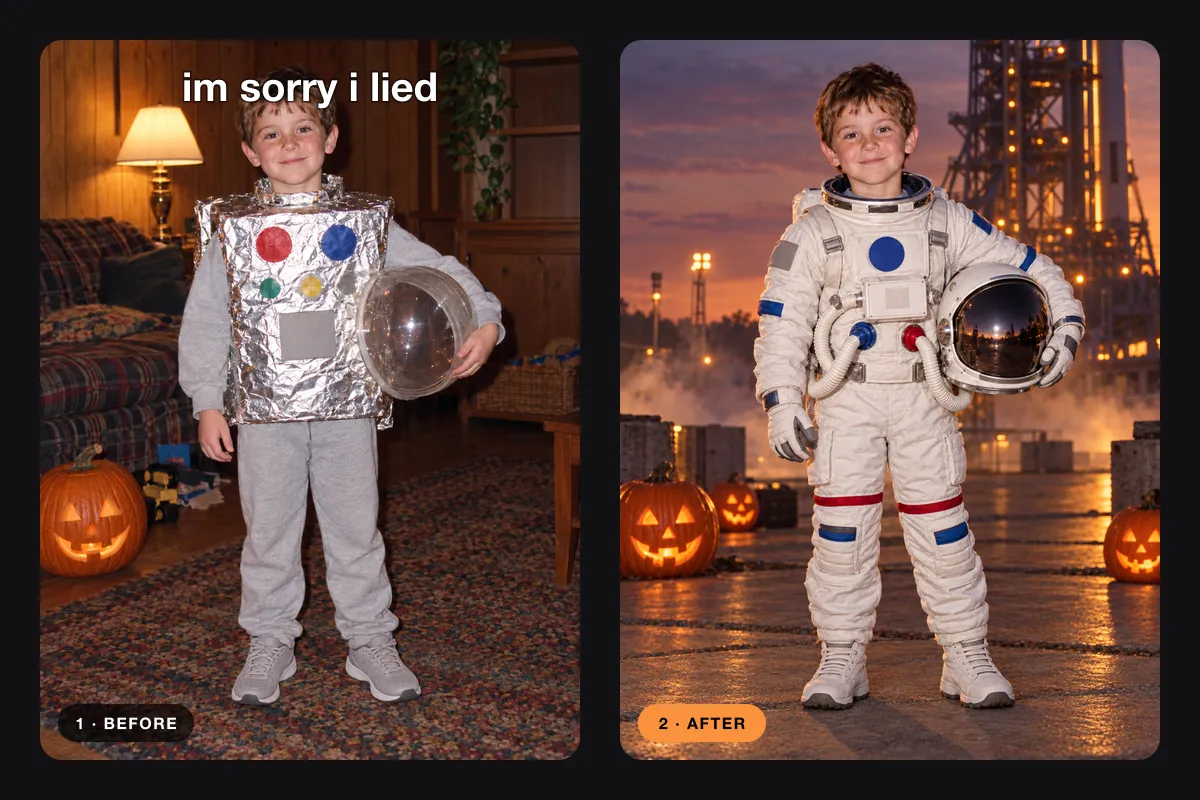
The example pairs in this guide were made for the article to show the format. Your redo follows your own photo.
What the I'm Sorry I Lied trend looks like
Every post follows the same recipe, which is why it is easy to copy:
- Slide one is real. An old photo of you, a sibling or your kid in a homemade or bargain costume. The worse the costume held up, the better the joke.
- The text is short. Lowercase "im sorry i lied" sits over the first photo, as if the kid owes everyone an apology for that costume.
- Slide two is the redo. The same face and the same age in a costume that looks like it came from a film set.
- It is a photo post. A TikTok photo carousel with the trend's sound, not an edited video.
The redo has to look like the same child. If the face changes, the joke is gone, because the point is "this is what I meant".
Why the I'm Sorry I Lied AI trend took off
It arrived in mid-October, right when everyone digs out old Halloween photos. Google already suggests the "im sorry i lied trend" for TikTok, Instagram and the song. Then come the how-to questions: people look for an "im sorry i lied ai template" or an "im sorry i lied tutorial chatgpt" route, because they want the redo slide without editing skills.
Three things keep it spreading:
- Everyone has the photo. Most families have at least one costume picture that went wrong, and the camera roll already did the work.
- The format is fixed. Two slides, one line of text, one sound. The only creative choice is the costume, so people post fast and post several.
- It travels in families. Parents redo their kids' old costumes, siblings redo each other's, and adults redo their own childhood photo as they look today.
How to do the I'm Sorry I Lied trend on Banana Pro AI
I'm Sorry I Lied Costume AI is built for this format. It keeps the original photo as slide one, makes the redo at 9:16 and exports slides ready to post.
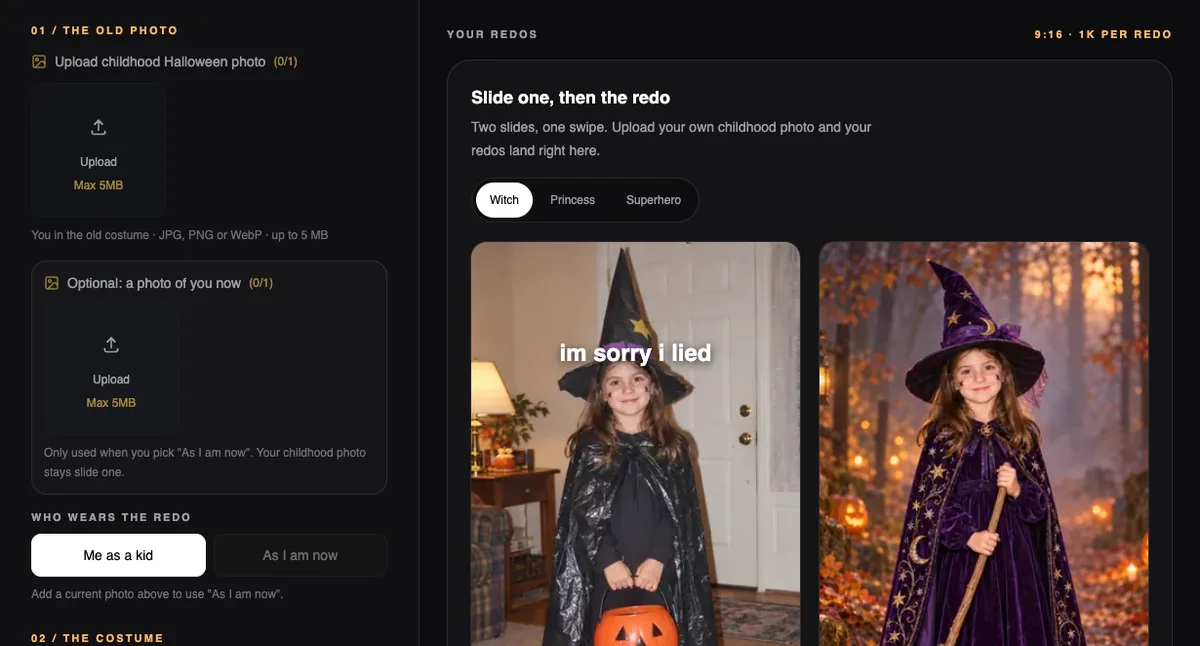
Step 1: Upload the childhood photo
Sign in and upload the old costume photo as a JPG, PNG or WebP of up to 5 MB. A phone scan of a printed photo works. Crop it so one child is clearly in frame and the face is not tiny.
If you want the redo to show you as you are now, add a current photo in the optional box and choose As I am now. The childhood photo still stays slide one.
Step 2: Name the costume you meant
Type the costume in the box, up to 120 characters, or tap a quick pick such as Witch, Pirate, Astronaut, Pumpkin or Skeleton. Be specific about materials and color, because that is what the redo builds. "Pirate captain with a long weathered coat and tricorn hat" beats "pirate".
Step 3: Make one, two or four redos
Choose how many redos to make. Each one is a separate image, so you can keep the best. A redo of you as a kid costs 15 credits and a redo as you are now costs 25, and the button shows the total before anything runs. If one fails, its credits come back.
Step 4: Export the 9:16 slides
Tap the redos you like, set their order and pick the options for slide one:
- Caption: "im sorry i lied" at the top, the bottom, or off.
- Framing: fit on white, fit on black, or fill the frame.
The slides come out as numbered 1080×1920 images, starting with 01-before. On a phone, use Save slides to phone so they land in your photos. On a computer, download the ZIP.
Step 5: Post the carousel on TikTok with the trend sound
Open a trend post you like, tap the sound name and choose Use sound. Switch the upload screen to photos and select 01-before first, then the redo slides in order. If you exported without the caption, add "im sorry i lied" to the first photo in TikTok. The same files work as an Instagram carousel.
8 I'm Sorry I Lied AI prompts you can copy
On Banana Pro AI the prompt is the costume line. The tool already handles the face, the age and the vertical frame, so each line below goes straight into the costume box. Copy one, then change the colors or details to match what you wanted that year.
1. Astronaut
astronaut in a realistic white space suit with mission patches, holding the helmet, launch pad at duskWorks for the cardboard-box and foil costumes. Holding the helmet keeps the face visible.
2. Pumpkin
plush round pumpkin costume with ribbed orange fabric and a leafy stem hat, sitting in a pumpkin patch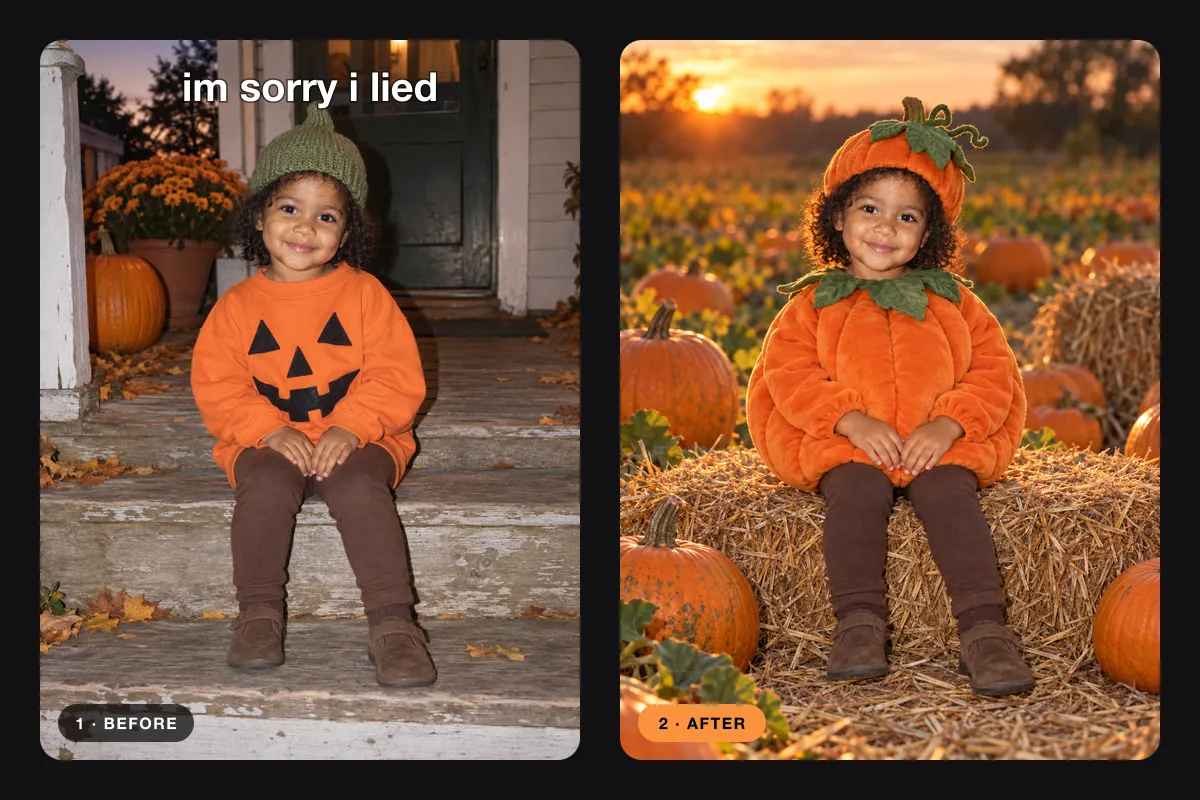
Good for toddler photos, where the original is often a sweatshirt with a face glued on.
3. Dinosaur
green dinosaur costume with scaled fabric, soft spikes and a long tail, hood framing the face, misty fern forest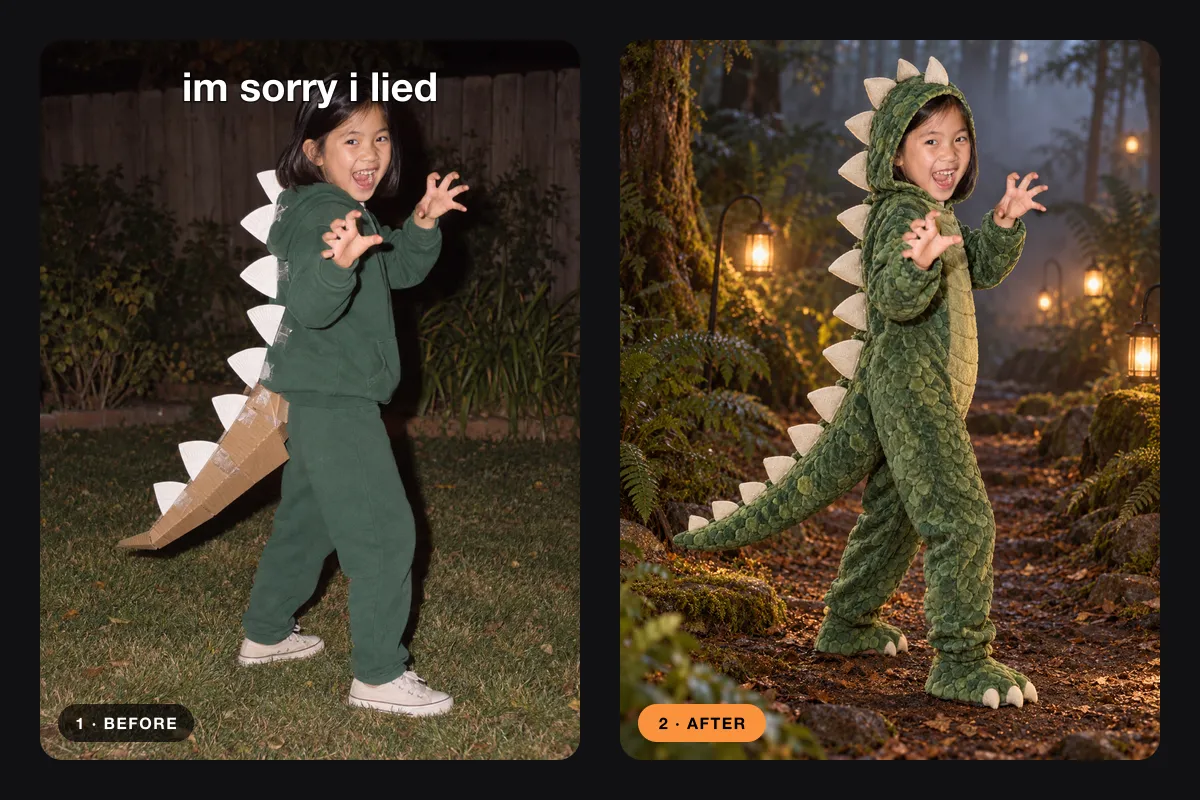
Ask for the hood to frame the face, so the costume does not cover it.
4. Pirate captain, as you are now
pirate captain with a long weathered coat, tricorn hat, leather belt and prop cutlass, ship deck with lanterns at night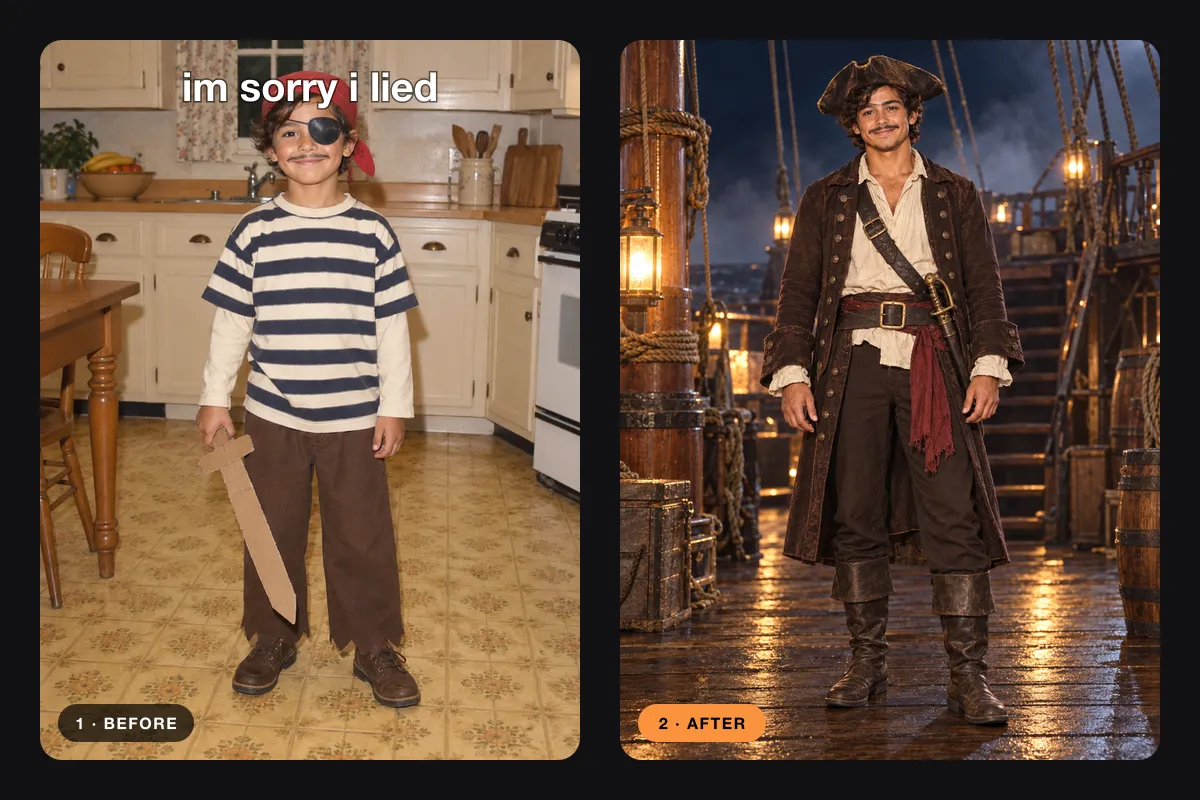
Use this with As I am now and a current photo. The punchline becomes "I finally finished it".
5. Witch
witch in a deep purple velvet dress, embroidered star cape and tall pointed hat, misty forest path with jack-o'-lanternsThe classic trash-bag cape redo. Purple reads better than black on a phone screen.
6. Fairy
fairy in a layered pastel tulle dress with shimmering wings and a flower crown, enchanted garden with soft lights7. Knight
knight in polished silver armor with a blue tabard and a wooden shield, castle courtyard with torches8. Ghost
friendly ghost in a flowing white sheet costume with a lace trim, face visible, old house porch with candles and fogKeep the face visible, or the redo stops looking like you.
ChatGPT, a CapCut template or Banana Pro AI
You can do this trend three ways. Here is what each one asks of you.
| ChatGPT | CapCut template | Banana Pro AI | |
|---|---|---|---|
| What you type | A full prompt | Nothing, the template sets the look | One costume line |
| Same face and age | Retry until it matches | Depends on the template | Built into the tool |
| 9:16 slides | Crop yourself | The template exports a video | 1080×1920 slides |
| "im sorry i lied" text | Add in TikTok | Usually in the template | On slide one, or off |
| Several versions | One at a time | One per template | Up to four per batch |
In ChatGPT, upload the photo and paste a prompt like this one:
Using this childhood Halloween photo as the reference, show the same child, with the same face, age, hair and skin tone, wearing a well-made pirate costume with a long coat and tricorn hat. Photorealistic, full body, vertical portrait, Halloween setting, no text.That works, but you write the prompt, check the face, crop to 9:16, add the caption and name the files in order yourself.
A CapCut template is handy when a template already matches the costume you want. The template decides the look, and you get a video edit, while the trend is a photo carousel.
Banana Pro AI keeps the steps the trend needs. You type one costume line, get up to four redos, and the export is already in posting order. For one post the difference is a few minutes. For a family's worth of costumes it saves an evening.
Tips for a better redo
- Pick the photo with the clearest face. A blurry face gives a redo that drifts.
- Describe materials, not vibes. "Velvet", "tulle", "silver armor" and "plush" give the redo something to build.
- Keep costumes fully covering. The tool only makes regular, fully covering costumes, which is also what the trend is about.
- Post more than one redo. Two or three after slides make the reveal last longer.
- Use your own photos, or photos of family members who are happy to be in the post.
I'm Sorry I Lied trend FAQ
What is the I'm Sorry I Lied trend?
It is a two-slide TikTok photo carousel. Slide one is a real childhood Halloween photo with an improvised costume and the text "im sorry i lied". Slide two is the same costume redone the way you pictured it, usually with AI, and the carousel plays over the trend's sound.
Is there an I'm Sorry I Lied AI template?
You do not need a video template, because the trend is a photo post. The I'm Sorry I Lied Costume AI page works as the template. It takes your photo and a costume name, then exports numbered 9:16 slides with the caption on slide one.
What prompt should I use for the I'm Sorry I Lied AI trend?
On Banana Pro AI the prompt is just the costume you meant to wear, up to 120 characters, such as "astronaut in a real white space suit". The tool already keeps your face, age and the vertical format, so you only describe the costume.
Can I do the I'm Sorry I Lied trend in ChatGPT?
Yes. Upload the childhood photo, ask for the same child in the finished costume in a vertical frame, and repeat until the face matches. You then crop to 9:16, add the caption yourself and order the slides by hand.
What song is used for the I'm Sorry I Lied trend?
Most posts share one TikTok sound that is often listed as an original sound, so search by post, not by title. Open a trend post you like, tap the sound name at the bottom and choose Use sound.
Does it cost anything?
Each redo uses credits, and the button shows the total before you start. A redo of you as a kid costs 15 credits and a redo of you as you are now costs 25. Exporting and saving the slides is free.
Make yours before Halloween
Find the photo, name the costume you promised, and let slide two finally deliver it. For other photo carousels, try the Instagram Carousel Maker, and to swap outfits outside Halloween, use the AI Clothes Changer.
