Limited Offer
Get 50% OFF on Annual Plans→
Manga Colorization Studio

AI Manga Colorizer

Colorize B&W manga pages with crisp ink lines, intact speech bubbles, and optional character palette references.

Colorize Your Manga Page

15 credits · 1K · Auto ratio
Live manga colorization
The same four-panel shonen manga page colorized in Anime Cel-Shading style with preserved panel borders, ink lines, and legible white speech bubblesBlack-and-white four-panel Japanese shonen action manga page with clean ink borders, dynamic screentones, and white speech bubblesB&W MangaColorized
1. Manga page (required)
2. Color reference images (optional, 0–2)0/2 refs

Lock character hair, eye, and outfit colors across chapter pages—poses are never copied.

3. Colorization style
0/240
Output resolution
Original ratio locked (Auto)

Before & After

See Black & White Manga Pages Colored With Intact Ink & Dialogue

Drag each slider to inspect crisp panel borders, pure-white speech bubbles with unaltered text, screentone-to-cel shading conversion, and character palette lock from a reference sheet.

The same four-panel shonen manga page colorized in Anime Cel-Shading style with preserved panel borders, ink lines, and legible white speech bubblesBlack-and-white four-panel Japanese shonen action manga page with clean ink borders, dynamic screentones, and white speech bubblesB&W MangaColorized

Anime Cel-Shading · 1K

4-Panel Action Page — Anime Cel-Shading

A crisp four-panel Japanese shonen action page converted from monochrome halftone screentones into studio anime cel-shading with black spiky hair and a bright orange jacket—keeping every gutter line, speed line, and white speech bubble crisp.

The same swordswoman manga panel colorized in Vibrant Shonen style matching silver hair, crimson eyes, and dark obsidian-and-gold cloak from the reference sheetDetailed black-and-white manga panel of an anime swordswoman in a dynamic poised stance with billowing cloak and clean ink lineworkB&W MangaColorized
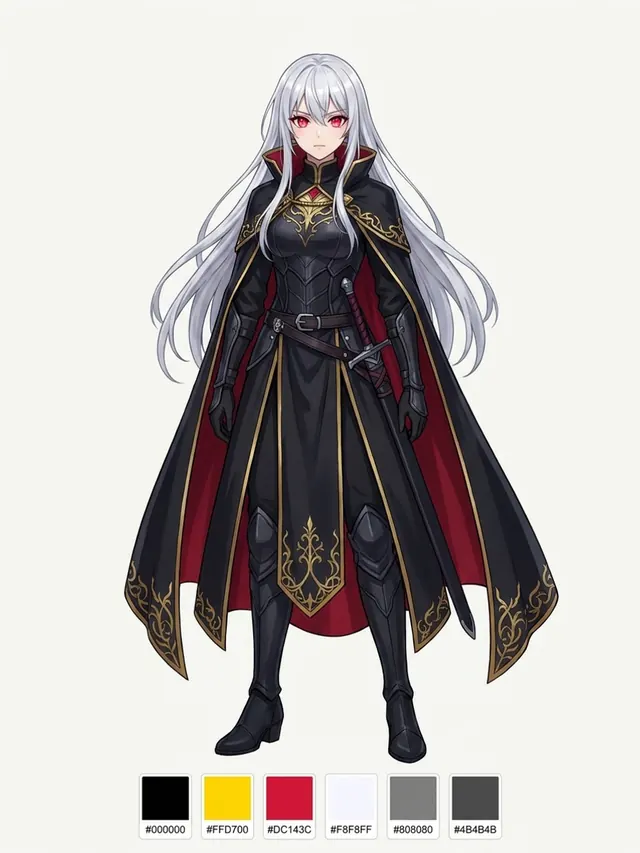
Full-color character reference sheet showing flowing silver hair, vivid crimson eyes, and a dark obsidian-and-gold trimmed cloak

Palette Reference

silver hair, crimson eyes, dark obsidian-and-gold cloak

Vibrant Shonen · Palette Ref

Swordswoman Panel — Character Color Lock

A poised B&W swordswoman manga panel paired with a full-color character reference sheet. Silver hair, crimson eyes, and an obsidian-and-gold cloak transfer directly from the reference while locking the panel's original pose and ink work.

The same seaside train station manga page colorized in nostalgic Retro 90s Anime warm amber and twilight-blue tones with preserved pen hatchingDelicate black-and-white slice-of-life Japanese manga page depicting a quiet seaside train station platform at dusk with fine pen hatchingB&W MangaColorized

Retro 90s Anime · 2K

Seaside Train Platform — Retro 90s Anime

A delicate slice-of-life manga page of a quiet coastal train station at dusk transformed into warm golden-amber and twilight-blue 1990s cel-animation tones while preserving every fine pen hatch line.

Manga-Grade Fidelity

Built for Manga Pages — Not Generic Photo Filters

AI Manga Colorizer treats every black ink stroke, panel gutter, halftone screentone, and white speech bubble as sacred structure. Instead of smearing gradients across borders or mangling dialogue letters, it translates monochrome manga shading into layered anime color while leaving original framing untouched.

Designed specifically for multi-panel manga pages, comic chapters, and doujinshi with optional character color references. Working on a single standalone sketch with custom hex swatches, or creating brand-new comic panels from scratch? Try AI Line Art Colorizer · AI Comic Generator.

Pure-White Speech Bubbles & Crisp Text

Locks dialogue bubbles, narration boxes, and sound-effect lettering so English or Japanese text stays sharp, un-tinted, and completely readable.

Up to 2 Character Color Reference Sheets

Attach up to two colored character sheets or previous colored frames to keep hair color, eye color, and uniforms consistent across an entire chapter—without copying poses.

Screentone-to-Cel Shading Translation

Reads monochrome halftone dots, cross-hatching, and ink shadows as lighting cues, converting them into clean anime cel shadows, rim light, and rich fabric textures.

Zero-Crop Auto Ratio & 2K Print Detail

Locks output framing to your uploaded manga page's exact aspect ratio so tall vertical webtoons and full B4/A4 manuscript pages never lose a single panel margin.

How It Works

How to Colorize Black & White Manga Pages

Go from monochrome manuscript or scan to publication-ready color manga in three focused steps.

  1. 01

    Upload Your B&W Manga Page & Optional Refs

    Drop one JPG, PNG, or WebP manga page (up to 5 MB, 256–4,096 px). Optionally attach 1–2 colored character sheets to lock recurring palette colors.

  2. 02

    Choose a Manga Style & Color Notes

    Pick from 6 curated anime and watercolor looks—Anime Cel-Shading, Vibrant Shonen, Soft Pastel, Watercolor Ink, Retro 90s Anime, or Moody Night—and optionally specify up to 240 characters of palette notes.

  3. 03

    Inspect Ink & Bubbles, Then Download

    Choose 1K (15 credits) for fast chapter drafts or 2K (40 credits) for crisp print detail. Use the split slider and 2× zoom inspector to check dialogue clarity before downloading.

Who It Helps

Built for Manga Creators, Colorists & Readers

Speed up color spreads, keep character palettes consistent across episodes, and preview full-color scenes without manually masking every screentone.

Indie Manga Artists & Doujinshi Creators

Turn monochrome chapter openings, key fight spreads, and character promos into full-color pages in minutes while keeping your hand-inked line weight intact.

Fan-Coloring & Scanlation Teams

Drop a character reference sheet alongside each page to maintain exact hair, eye, and uniform colors across multi-page fight arcs and emotional scenes.

Webtoon & Graphic Novel Studios

Test Anime Cel, Retro 90s, Watercolor, or Moody Night color scripts on the same inked page before committing hours to manual flatting and rendering.

AI Manga Colorizer vs Line Art Colorizer & Photo Colorizer
ToolBest ForPanels & Speech BubblesColor Control
AI Manga Colorizer (This Tool)Black-and-white manga pages, multi-panel chapters, and halftone screentone artworkStrictly preserves panel borders, gutters, speed lines, and pure-white text bubbles with zero cropping6 manga styles + up to 2 character color reference sheets + 240-char color notes
AI Line Art ColorizerSingle clean line-art illustrations, coloring sheets, and flat-fill digital drawingsPreserves drawn contours with a live local line-overlay checkerFlat or soft shading + up to 5 exact hex color swatches
Image ColorizerHistorical black-and-white photographs, vintage portraits, and archival film stillsOptimized for photographic grain and skin realism rather than comic panelsAutomatic natural photo color reconstruction

FAQ

Frequently Asked Questions

Answers to the most common questions about speech bubbles, character reference sheets, resolution, and pricing.

Will AI Manga Colorizer ruin or blur the text inside speech bubbles?

No. The colorization brief explicitly locks every speech bubble and narration box to pure crisp white while preserving original black dialogue lettering untouched. After generation, you can toggle the 2× zoom inspector right inside the workbench to verify every word before downloading.

How do the optional Color Reference Images work?

You can attach up to 2 colored character sheets or previously colored panels in the secondary slot. Image 1 is always your black-and-white manga page; the optional reference images are used exclusively for hair, eye, skin, and outfit color palettes—never for copying poses, framing, or backgrounds.

Does it crop tall vertical manga pages or multi-panel spreads?

Never. Aspect ratio is locked to Auto on the server so your full-color result matches the exact proportions of your uploaded page—keeping every panel border, bleed edge, and gutter intact.

What is the difference between 1K and 2K resolution?

1K (15 credits) is fast and ideal for previewing color scripts, social posts, and testing different styles. 2K (40 credits) preserves finer pen cross-hatching, intricate screentone transitions, and sharper dialogue lettering for print or high-DPI digital chapters.

Can I switch manga styles or edit color notes without re-uploading my page?

Yes. Your uploaded B&W manga page, character reference images, and color notes remain loaded while you test different styles or switch between 1K and 2K. Changing settings updates your live credit quote immediately and never charges credits until you click Colorize Manga Page.

What happens if I refresh mid-colorization or a generation fails?

Active runs are saved locally in your browser so reloading resumes polling the same task instead of double-charging. If a run fails before returning an image, reserved credits are automatically refunded.