
Text to image
Describe the subject, framing, materials and light, then generate a finished image without uploading anything.
Precise local edits, stable iterations, production-ready images
Start with a prompt for a new image, or upload a reference to replace text, change an outfit, restyle a product or refine one region. Set the aspect ratio and resolution, review the credit cost, then generate without leaving the page.

Swap a background and keep the product label

Edit one line of text on a finished poster

Change an outfit and keep the same character
Last reviewed September 20, 2026 · By Banana Pro AI
Nano Banana 2.5 is Google’s next-generation Nano Banana image model for generating and editing pictures. It follows the instruction you give it more closely: replace text, change clothing, swap an object or refine a single region, while the composition, identity and lighting around that change stay in place.
On Banana Pro AI, Nano Banana 2.5 runs in the browser. Start from a prompt for a brand-new image, or upload a reference photo and describe a focused edit. Choose an aspect ratio and 1K, 2K or 4K output, check the credit cost, and keep the result or refine it in the same workspace.
Describe the subject, framing, materials and light, then generate a finished image without uploading anything.
Upload a product photo, poster or portrait and change only what you name. Everything you leave out stays as it is.
Pick the aspect ratio and resolution for the channel you are building, from social crops to large posters.
See the rest of the family in Nano Banana 2, Nano Banana 3 and GPT Image 2.5.
Nano Banana 2.5 is built for edits you can review and repeat. These are the six things it does best.
Edit exactly what you describe and leave the rest of the picture alone. Replace text, clothing, objects or a single region while the composition around it survives.
Build on the previous result. Each round preserves the parts you already approved instead of quietly re-inventing the subject, the layout or the lighting.
Lower latency per render means more concepts, more revisions and a shorter feedback loop with whoever signs off on the visual.
Natural shadows, balanced highlights and believable materials for portraits, products and cinematic compositions.
Move from concept to marketing, product and commercial assets with output that stays predictable across a whole set.
Headlines, labels and short copy keep their wording, hierarchy and alignment when you change something else in the frame.
Three briefs you can copy into the workspace above: a product scene, a text edit on a finished poster, and a character change that keeps the same face.
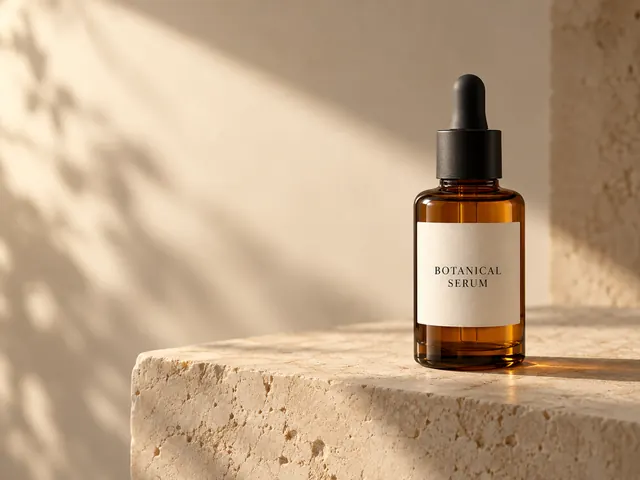
Example 01
Upload a product photo and describe the new scene in plain language. State that the bottle shape, label wording and colours must stay identical, and only the background should change. Compare the result with your source at full size; if a detail drifts, name it exactly and generate again.
Place this amber bottle on warm limestone with soft afternoon light. Keep the bottle shape, label text and colours exactly the same. Change only the background.
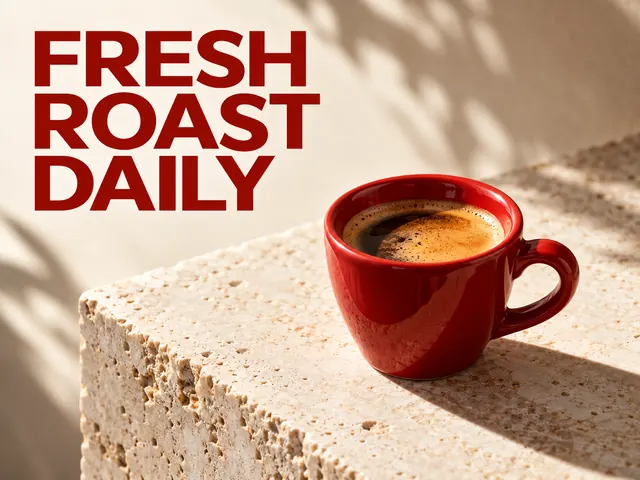
Example 02
Give the exact replacement words in quotation marks and name the area that may change. Ask the model to keep the layout, typeface, colours and every other element untouched. Check the spelling and the fixed elements at full size before you publish.
Change only the headline on this poster to “FRESH ROAST DAILY”. Keep the layout, typeface, colours and all other text unchanged.
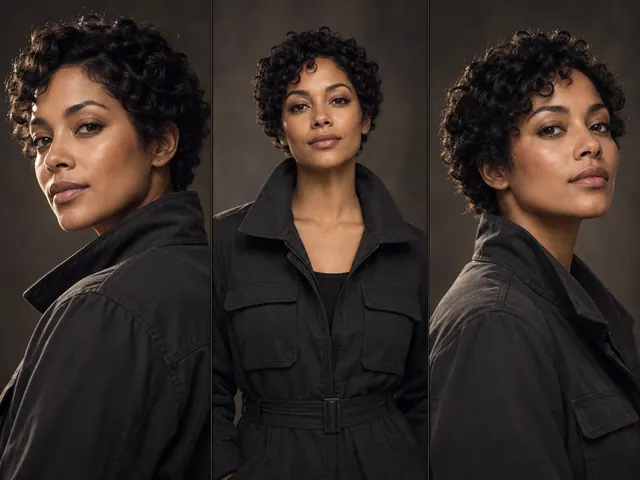
Example 03
Start from one portrait, then describe the new clothing and the setting for each frame. Name the face, hair and pose you want to preserve so a small series stays recognisable. Reuse the previous result as the next reference to keep the character consistent.
Keep the same person, face, hair and pose. Change the outfit to a dark utility jacket and place the character in a softly lit studio. Same camera angle.
Four steps from an idea to a finished image, whether you are starting from text or from a photo you already own.
Write the subject, framing, material and light. For an edit, state what must stay unchanged and put any exact text in quotation marks.
Upload one or more images to edit, or leave the upload area empty for text-to-image. With a reference attached, the workspace switches to reference-based editing.
Choose an aspect ratio and 1K, 2K or 4K. The workspace shows the fixed credit cost for that run before you submit.
Download the result, or send it back in as the next reference to refine it. A submitted task is saved, so a refresh does not lose it.
Both models generate and edit images in the same workspace. Nano Banana 2.5 is the newer generation, and the difference shows up most clearly in editing work.
| What changes | Nano Banana 2.5 | Nano Banana 2 |
|---|---|---|
| Positioning | The newer generation, aimed at precise local changes, stable refinement and production work | A versatile all-round image model for general generation and editing |
| Local editing | Replaces text, clothing, objects and selected regions with tighter control over the surrounding image | Handles targeted edits; complex changes can pull in more of the surrounding picture |
| Iterative editing | Preserves previous changes across several rounds, so a series stays consistent | Supports multi-step editing, with more visible drift between rounds |
| Text in images | More reliable for headlines, labels and short copy that must be replaced exactly | Works well for short text; expect more retries on long or precise wording |
| Light and detail | More natural shadows, highlights and material response | Solid lighting and detail for everyday images |
| Speed | Faster renders per revision | Strong quality with longer waits |
| Best for | Local edits, text replacement, product visuals, campaigns and iterative design | General generation, concept art and social content |
When you compare image workspaces, these are the checks that decide whether a tool is easy to use. Here is how this page behaves.
| What to check | On Banana Pro AI | What to verify elsewhere |
|---|---|---|
| Generate and edit | Both in one workspace, no second tool | Whether the same tool does both jobs |
| Credits before you generate | A fixed quote shown in the workspace | Where and when the price appears |
| Reference images | Upload several references for one edit | How many references a tool accepts |
| Task recovery | Submitted tasks resume after a refresh | Whether a closed tab loses work |
| Reading before sign-in | Compare and read without an account | What is locked behind sign-in |
These are the workflows where precise editing, reliable text and consistent details matter most.
Build promotional visuals with a clear hierarchy, readable headlines and one consistent campaign direction.
Restage a product photo with a new surface, background and lighting while the shape, label and packaging stay intact.
Refine an approved direction step by step while the framing, subject and details you signed off stay stable.
Keep colours, typography, logos and framing aligned across a set of banners, covers and social crops.
Explore recurring characters, outfits and locations, then carry the same identity into storyboards.
Review layouts, icons, grids and small type where precision matters more than spectacle.
An image on this page costs 20 credits at 1K, 35 at 2K and 50 at 4K. The workspace quotes the exact cost for your resolution before you submit, and a failed task is refunded through the task system. An accepted request keeps running if you close the page.
Generating requires an account and uses Banana Pro AI credits. Reading this page, comparing models and preparing a prompt are free. Pick the credit pack that matches how many revisions you expect to run.
These credits are Banana Pro AI service prices, not a conversion of any provider invoice.
Compare plans on the pricing page.
Nano Banana 2.5 is Google’s next-generation Nano Banana image model for creating and editing pictures. It is built around precise local edits, stable refinement across several rounds, realistic lighting and production-ready output, and you can run it in the workspace on this page.
More control around a local edit, more stability when you refine the same image repeatedly, faster renders per revision, and more believable shadows, highlights and materials.
Yes. Put the replacement wording in quotation marks and name the area that may change. The model aims to keep the layout, typeface, colours and surrounding elements in place, so always check the spelling at full size before you publish.
It is built for them. Restage a product photo with a new background, surface or lighting while the shape, label and packaging stay consistent, then reuse the result as the reference for the next channel.
Choose an aspect ratio and 1K, 2K or 4K resolution. Those are the controls this workspace exposes for generation and reference-based editing.
The first Nano Banana is Gemini 2.5 Flash Image, an earlier Google image model that happens to carry a 2.5 in its version number. Nano Banana 2 and Nano Banana 2.5 are later generations of the Nano Banana line.
20 credits at 1K, 35 at 2K and 50 at 4K. The workspace shows the fixed quote for your chosen resolution before you submit, and failed tasks are refunded through the task system.
Review the applicable service terms and make sure you have permission to use any uploaded photographs, logos or reference material. Inspect output for unwanted trademarks, text errors and misleading details before using it in advertising.
Generation uses Banana Pro AI credits and requires sign-in. You can read this page, compare models and prepare a prompt without an account.
This guide follows Google’s image-generation documentation and the Nano Banana product announcements, last reviewed September 20, 2026. Model behaviour can change between releases, and the workspace above always shows the model you are running.
Write a prompt for a new image, or upload a photo and describe the edit you want. Set the size, check the credit cost, and refine from there.