
Nano Banana 2.1 is Google's newest image generation and editing model. It went generally available on October 6, 2026, under the API id gemini-nano-banana-2.1. Google describes it as an update to Nano Banana 2 (Gemini 3.1 Flash Image). It keeps "Flash-level speed and cost efficiency" while improving visual quality, prompt adherence, multi-turn character consistency and text rendering. In the same release, Google marked Nano Banana 2 as deprecated and told developers to migrate.
This guide covers what actually changed, using Google's own documentation. It compares Nano Banana 2.1 with Nano Banana 2 and Nano Banana Pro on features and list price, and reads Google's own benchmark numbers with the caveats they need. It also gives you three copyable prompts for the jobs where the update matters most: posters with exact text, product edits that keep the label, and the same character across several scenes.
| Item | What Google documents |
|---|---|
| Model | Nano Banana 2.1, API id gemini-nano-banana-2.1 |
| Built on | Gemini 3.6 Flash, according to Google DeepMind's model card |
| Status | Generally available (stable) since October 6, 2026 |
| Replaces | Nano Banana 2 (gemini-3.1-flash-image), now deprecated with no shutdown date announced |
| Inputs | Text, images, video and PDF; output is image and text |
| Resolutions | 1K (default), 2K and 4K; the 0.5K size from Nano Banana 2 is not supported |
| Reference images | Up to 14 per prompt: up to 4 characters and up to 10 objects with high fidelity |
| Aspect ratios | 15, from 1:1 to the panoramic 1:8 and 8:1 |
| List price | About $0.034 (1K), $0.050 (2K) and $0.113 (4K) per image on the Gemini API |
| Watermark | Every image carries an invisible SynthID watermark |
| Try it in a browser | The Nano Banana 2.1 image generator on Banana Pro AI, no code needed |
What is Nano Banana 2.1?
"Nano Banana" is Google's name for the native image capabilities of its Gemini models. You type a request in plain language, optionally add photos, and the model answers with an image you can keep refining in conversation. Nano Banana 2.1 is the current high-efficiency member of that family. In Google's words it is "the primary high-efficiency workhorse model for image generation and conversational editing". The Gemini API image guide now recommends it for all new projects.
The nickname itself started as a joke. Google's blog tells the story: in late July 2025 the team needed a codename to test the first model, Gemini 2.5 Flash Image, anonymously on LMArena. At 2:30 a.m., product manager Naina Raisinghani suggested "Nano Banana", a mash-up of two of her own nicknames. The name stuck, and every model since has kept it.
The point of a ".1" release is easy to miss. Nano Banana 2.1 is not a new tier above Nano Banana Pro. It is a better version of the fast, cheaper model. Google positions it as "the more efficient counterpart" to Nano Banana Pro (Gemini 3 Pro Image), which stays the premium option for the hardest professional work. If you already use Nano Banana 2 for volume work like product shots, social posts, thumbnails and quick edits, Nano Banana 2.1 is the model Google wants you on next.
Like the other Gemini 3 image models, Nano Banana 2.1 is a thinking model. Before rendering, it reasons through the prompt and may draft interim "thought images" to fix the composition. Google says those drafts are not charged. What is new in 2.1 is a three-step dial for that reasoning, covered below. Google DeepMind's model card says Nano Banana 2.1 is built on Gemini 3.6 Flash, with a knowledge cutoff of March 2026. In some domains its knowledge stops at January 2025.
Where Nano Banana 2.1 sits in the Nano Banana family
The family has grown fast, and the names are confusing. Here is the lineup as of October 2026, with dates from Google's Gemini API release notes and deprecation table:
| Model | Role | Key dates |
|---|---|---|
| Nano Banana (Gemini 2.5 Flash Image) | The original; now legacy | Stable since October 2, 2025; shutdown March 15, 2027 |
| Nano Banana Pro (Gemini 3 Pro Image) | Premium, highest world knowledge and control | Preview November 20, 2025; stable May 28, 2026 |
| Nano Banana 2 (Gemini 3.1 Flash Image) | Previous high-efficiency workhorse | Preview February 26, 2026; stable May 28, 2026; deprecated October 6, 2026 |
| Nano Banana 2 Lite (Gemini 3.1 Flash-Lite Image) | Fastest and cheapest, 1K only | Stable June 30, 2026 |
| Nano Banana 2.1 | Current high-efficiency workhorse | Stable October 6, 2026 |
Two details stand out. First, Nano Banana 2.1 drops the "Gemini 3.x Flash Image" naming. Earlier ids looked like gemini-3.1-flash-image; the new one, gemini-nano-banana-2.1, uses the nickname itself, so the name you search for and the id you call are finally the same. Second, the deprecation table lists gemini-nano-banana-2.1 as the recommended replacement for most retired image models, including the Imagen 4 models that shut down on August 17, 2026. For most image work on the Gemini API, it is now the default answer.
What's new in Nano Banana 2.1
Google's model page lists six key updates. Here is each one in plain terms, and why it matters in practice.
Better visual quality at every resolution
The first claim is "improved visual quality and realism across 1K, 2K, and 4K output resolutions". The default is still 1K. Higher sizes cost more tokens, though the per-image premium is modest, as the pricing section shows. Google's DeepMind page frames the same change as "more natural-looking images". That matters most for product and lifestyle photos, where a slightly plastic look gives the image away.
Wide and panoramic ratios without tiling
The most specific fix in the release targets panoramas. Earlier Flash models could show repeating, tile-like artifacts when you asked for very wide or very tall frames at high resolution. Google says Nano Banana 2.1 "fixed tiling artifacts on wide and panoramic aspect ratios (1:4, 4:1, 1:8, 8:1) at 2K and 4K resolutions". If you make website banners, event backdrops, long infographics or vertical story strips, this is the fix to watch.
More accurate text and infographic layouts
Text rendering was already a Nano Banana strength. The 2.1 notes add "enhanced text rendering and infographic layout accuracy". Layout is the important word. It is one thing to spell a headline correctly and another to keep a subline, a date and a venue in the right blocks of a poster. Google's own advice still applies: for text-heavy images, write the exact text first, then ask for the image that contains it.
Up to 14 references, with clear fidelity limits
Nano Banana 2.1 accepts up to 14 reference images in one request. The API documentation is precise about what "fidelity" means. Within those 14 images, the model aims to keep the resemblance of up to 4 characters and the detail of up to 10 objects, the same limits as Nano Banana 2. Nano Banana Pro keeps up to 5 characters but only up to 6 high-fidelity objects. Note that Google's DeepMind marketing page quotes "five characters" and "fourteen objects" for the family. The developer documentation gives the lower, model-specific numbers above, and that is the figure to plan around.
Search grounding with web and image results
Like Nano Banana 2, version 2.1 can use Grounding with Google Search, including Google Image Search as a source of visual context. Ask for an accurate rendering of a specific bird, landmark or product, and the model can look it up first. This is an API feature and comes with its own billing: 5,000 free search requests per month shared across Gemini 3.x models, then $14 per 1,000. Google also notes a limit: grounding cannot use real-world images of people from web search.
Configurable thinking levels
Nano Banana 2.1 is the first Flash image model with three thinking levels: minimal, medium and high, with medium as the default. Nano Banana 2 offered only minimal and high and defaulted to minimal. In practice, the default 2.1 request reasons more than the default Nano Banana 2 request did. That should help complex, multi-constraint prompts. You can turn the level down when speed matters more than precision.
Beyond the six headline items, the docs note that 2.1 accepts video input for video-to-image work, such as a thumbnail or poster from a clip. On Google Cloud it also supports Content Credentials (C2PA) metadata alongside SynthID. One thing that did not change: you cannot set a seed or temperature. On Google's Gemini Enterprise Agent Platform, sending either returns an API error.
Nano Banana 2.1 vs Nano Banana 2 vs Nano Banana Pro
The table below sets the three main models side by side, using the Gemini API documentation and standard paid-tier list prices as published on October 7, 2026. Prices change, so check Google's pricing page before you budget.
| Nano Banana 2.1 | Nano Banana 2 | Nano Banana Pro | |
|---|---|---|---|
| API id | gemini-nano-banana-2.1 | gemini-3.1-flash-image | gemini-3-pro-image |
| Status | Stable, recommended | Deprecated, no shutdown date | Stable |
| Price per 1K image | about $0.034 | about $0.067 | about $0.134 |
| Price per 2K image | about $0.050 | about $0.101 | about $0.134 |
| Price per 4K image | about $0.113 | about $0.151 | about $0.24 |
| 0.5K (512px) output | No | Yes | No |
| Thinking levels | minimal, medium, high (default medium) | minimal, high (default minimal) | Thinking on by default |
| High-fidelity references | 4 characters, 10 objects | 4 characters, 10 objects | 5 characters, 6 objects |
| Image Search grounding | Yes | Yes | Web search only |
| Best for | Most new image work at volume | Existing tuned pipelines | Hardest brand, localization and precision jobs |
The most surprising row is price. Nano Banana 2.1 bills image output at $30 per million tokens, half of Nano Banana 2's $60. Its input tokens cost more, at $1.50 against $0.50 per million, so heavy multi-reference edits narrow the gap. For typical generations, though, the newer model is cheaper per image at every size. The saving is about half at 1K and 2K and about a quarter at 4K. The Batch API halves those prices again for jobs that can wait.
One number is still unsettled. Google's image generation guide lists 2,520 tokens for a 4K image, which works out to about $0.076, and several launch reports quoted that figure. The pricing page and the Google Cloud model page list 3,780 tokens, or about $0.113. This guide uses the higher figure until Google aligns the two.
Which one should you pick? For most new projects, start with Nano Banana 2.1. Google recommends it, it costs less per image than Nano Banana 2, and it fixes the panorama and layout problems that made the older model frustrating for banners and infographics. Stay on Nano Banana 2 only if you have a pipeline tuned to its output or you need 512px drafts. Consider Nano Banana Pro when the job needs Google's highest "world knowledge", advanced localization or strict brand consistency. Google's own preference scores below put 2.1 ahead of Pro, so run both on your hardest brief before you pay the premium.
What the Nano Banana 2.1 benchmarks say
Google DeepMind published a model card for Nano Banana 2.1 on October 6, 2026, with Elo scores from side-by-side human evaluations. Raters compared outputs from different models on the same prompt and picked the one they preferred. Higher is better, and each score has a margin of error of roughly 10 to 20 points. Here is a selection, with 2.1 shown with thinking on:
| Capability | Nano Banana 2.1 | Nano Banana 2 | Nano Banana Pro |
|---|---|---|---|
| Overall preference (text-to-image) | 1050 | 990 | 935 |
| Infographic design | 1048 | 961 | 912 |
| General editing | 1026 | 938 | 939 |
| Multi-character consistency | 1106 | 978 | 1011 |
| Product consistency | 1024 | 955 | 965 |
| Mask or ink-based editing | 1049 | 965 | 927 |
| Multi-reference editing | 1066 | 988 | 989 |
Two results stand out. The largest gain is multi-character consistency, which matches the release notes. And thinking matters. With thinking off, 2.1 scores 1015 on overall preference instead of 1050, still ahead of the other two. Google also reports an automated "infographic factuality" score of 0.521 for 2.1 with thinking, against 0.179 for Nano Banana 2 and 0.265 for Pro.
Read these numbers as a strong signal, not a verdict. They are Google's own evaluations of Google's own models, run on Google's prompt sets, and no independent lab had reproduced them at launch. Early hands-on reviews were more mixed. The Decoder, for example, wrote that Nano Banana Pro "often still produces noticeably better images" in its own trials. The useful takeaway is narrower: on Google's internal tests, 2.1 is not a side-grade. It beats its predecessor everywhere Google measured.
The "mask or ink-based editing" row deserves a note. The model card describes ink or doodle-based editing, where marks drawn on an image show the model what to change. Google's marketing calls this "mask-based editing". The Gemini API documentation does not describe a separate mask parameter, so treat it as marking up the image you upload, not as a pixel-exact mask.
Known limitations
The model card lists several limits, and Google's image pages add a few more:
- Small text: small text is "often blurry" at 1K, and long paragraphs render poorly. Use 2K or 4K for dense copy.
- Consistency: character resemblance between input and output is "not always perfect".
- Marked-up edits: instructions are only partly followed in doodle-based edits, and the ink can stay visible in the result.
- Pose carry-over: in rare edits the subject keeps its original pose when you asked for a new one.
- Left and right: the model sometimes confuses spatial directions.
- Facts and data: infographics and diagrams can contain wrong information, so verify data-driven output.
- Speed: Google notes occasional slowness or timeouts.
How to use Nano Banana 2.1
You can reach Nano Banana 2.1 three ways, depending on whether you write code.
In Google AI Studio and the Gemini API
Developers can try the model in Google AI Studio, then call it through the Gemini API. It is also on Google Cloud's Gemini Enterprise Agent Platform, with the Batch API for bulk jobs. Google's example uses the Interactions API. Here it is with a 16:9, 2K output and the highest thinking level:
from google import genai
import base64

client = genai.Client()
interaction = client.interactions.create(
    model="gemini-nano-banana-2.1",
    input="A cozy reading nook by a rainy window, warm lamp light, film photo",
    generation_config={"thinking_level": "high"},
    response_format={"type": "image", "aspect_ratio": "16:9", "image_size": "2K"},
)
with open("nook.png", "wb") as f:
    f.write(base64.b64decode(interaction.output_image.data))
To edit, pass reference images with the prompt, or continue an earlier interaction with previous_interaction_id. Each turn then builds on the last image. The free tier does not include this model. Image output is billed on the paid tier only.
In the Gemini app and other Google products
Google DeepMind's model card lists the Gemini app, Google Search AI Mode, Google Ads, Google Flow and Google Stitch as channels for Nano Banana 2.1. Launch coverage described the app rollout as gradual, and the Gemini app release notes had no entry for the model as of October 7, 2026. These products also don't always show which image model ran. If you need to know which model made an image, use AI Studio, the API or a tool that names the model it runs.
On Banana Pro AI, without code
If you would rather not set up an API key, Banana Pro AI runs Nano Banana 2.1 in the browser. Open the Nano Banana 2.1 page and type a prompt of at least 3 characters. Pick 1:1, 4:3, 3:4, 16:9 or 9:16, and choose 1K, 2K or 4K. To edit instead of generating from scratch, add up to 14 JPG, PNG or WebP references (10 MB each) with the image button. They are sent in the order shown, so put the main subject first. A run costs 20, 35 or 60 credits for 1K, 2K or 4K. The button shows the price before you submit, and a failed task returns its credits. Credit packs and plans are on the pricing page.
The browser workspace covers the core of the model: text-to-image, multi-reference editing and the three resolutions. The extra-wide 1:4, 4:1, 1:8 and 8:1 ratios, search grounding and thinking-level control are API features and are not exposed there.
Three Nano Banana 2.1 workflows to try
The three workflows below match the improvements Google highlights. Each has a copyable prompt and notes on what to check in the result.
None of the images in this article is a Nano Banana 2.1 output. They are illustrations made with OpenAI image generation in Codex to show what each workflow is aiming for. Run the prompts yourself to see what Nano Banana 2.1 actually produces.
1. A poster with exact, correctly placed text
This is the test for the "text rendering and infographic layout" claim. The prompt gives every line of copy in quotation marks, says where each line sits and forbids extra text. Those three habits do more for text accuracy than any style keyword.
A vertical event poster for a night market, photographed as a printed poster on a slightly textured paper stock. Warm string lights and paper lanterns glow over a crowded harbor-side market at dusk, painted in a bold graphic style with deep teal and amber tones. Large headline at the top in a heavy condensed sans-serif, cream colored: "NIGHT MARKET". Directly below in smaller amber letters: "FRIDAY 6 PM". At the bottom, centered, in spaced capitals: "HARBOR SQUARE". No other text, logos or numbers anywhere in the image. Aspect ratio 3:4, high resolution.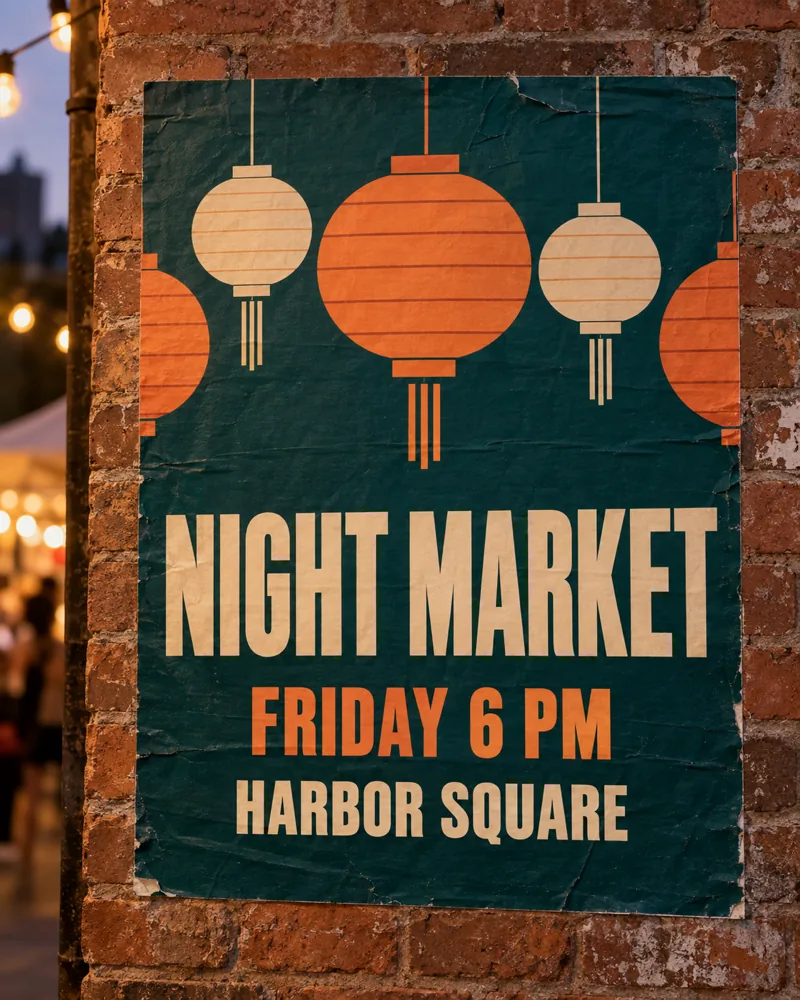
Three lines of copy, each in its own position. Illustration made with OpenAI image generation, not a Nano Banana 2.1 output.
What to check: read every letter, including the small line, against your copy. If one word comes out wrong, don't rewrite the whole prompt. Ask for that word only and keep everything else the same. Choose 2K or 4K if the poster will be printed. For finished poster templates and layouts, you can also create an AI poster and then refine it.
2. A product scene edit that keeps the label
Product teams need the bottle, box or tin to stay exactly the same while everything around it changes. Upload a clean product photo as image 1, then list what must stay and what should change. The more explicit the "keep" list, the less the model reinterprets your packaging.
Use image 1 as the product. Keep the amber glass dropper bottle exactly as it is: same shape, same black dropper cap, same cream label with the word "LUMA" and the line "Daily Serum" in the same font, size and position. Do not change, translate or add any label text. Change only the setting: place the bottle on a warm travertine bathroom shelf with soft morning window light from the left, a sprig of eucalyptus and a folded white linen towel beside it, shallow depth of field, natural shadows under the bottle. Photorealistic product photography, 1:1.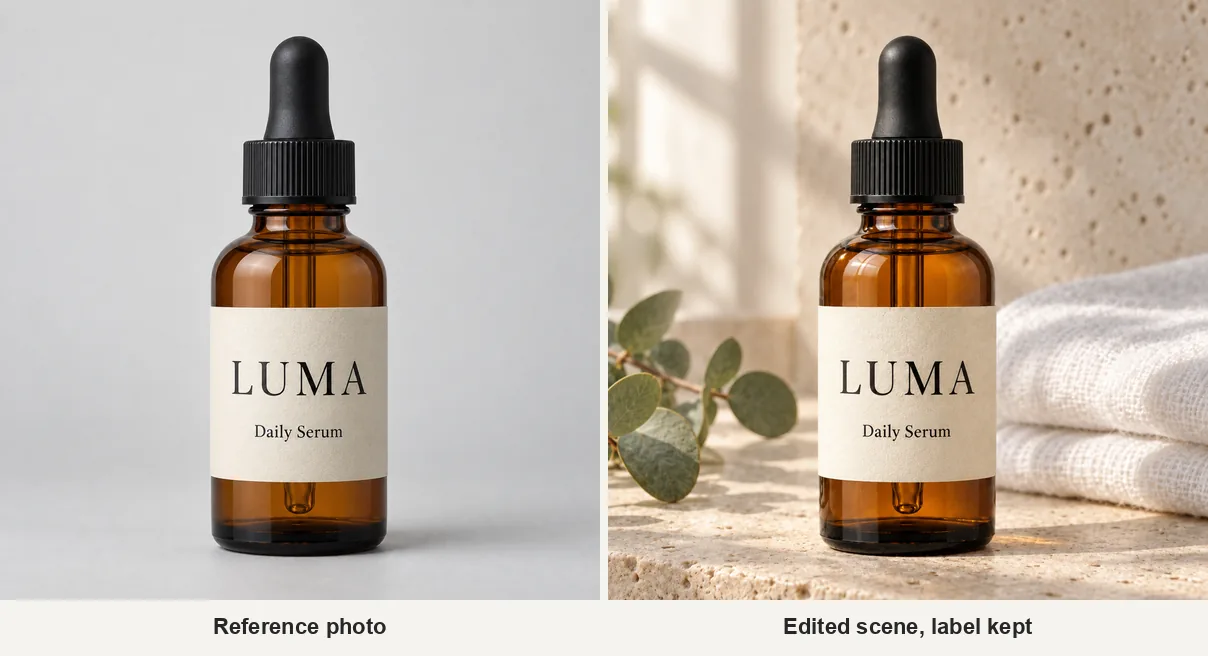
Left: the reference photo. Right: the edited scene with the label kept. Illustration made with OpenAI image generation, not a Nano Banana 2.1 output.
What to check: compare the label side by side with your original. Look at the letter spacing, line breaks and logo position, and whether the cap or bottle shape drifted. Check the shadow and reflection too, because a product that floats above the shelf is the first thing shoppers notice. If you need a whole set of listing images, our tools can create product photos for marketplaces in a few clicks.
3. The same character across three scenes
The 2.1 release highlights "multi-turn character consistency". Within one request the API keeps up to 4 characters recognizable. In practice, consistency comes from a fixed description plus a reference you reuse. Generate the character once, keep that image as image 1, then change one thing per run: the setting, the pose or the light.
Use image 1 as the character. Keep her face, curly shoulder-length dark hair, light freckles and mustard knit cardigan exactly the same. Show her in three side-by-side panels of equal width: on the left, pouring steamed milk into a latte at a warm cafe counter; in the middle, standing on a rainy city street at dusk holding a clear umbrella; on the right, laughing on a rooftop at golden hour with the city behind her. Same person, same outfit, consistent proportions in every panel. Natural candid photography, 35mm look, no text.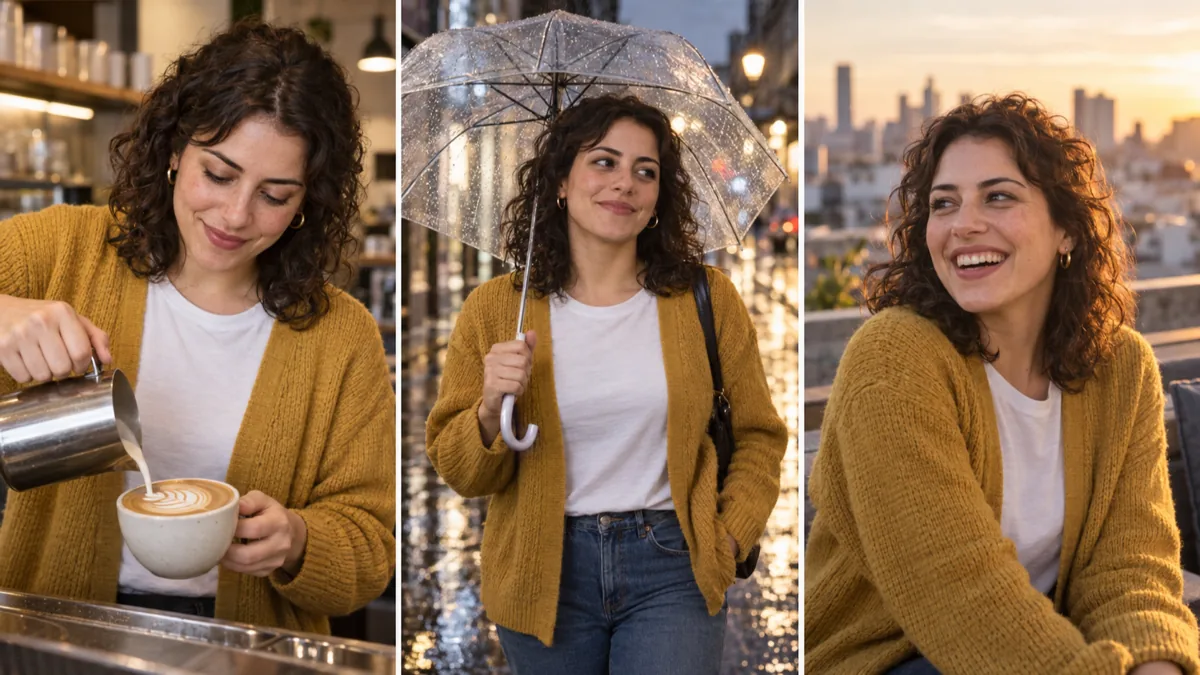
Same face, hair and cardigan in three scenes. Illustration made with OpenAI image generation, not a Nano Banana 2.1 output.
What to check: look at the face first: eye shape, hairline and freckles. Then check the details that drift most often, such as the cardigan's color, button count and knit pattern. For a story or a campaign, one panel per request often holds the identity better than a triptych. On Banana Pro AI, use each finished result as the reference for the next scene, so every run starts from the same face. The older Nano Banana 2 model page is still there if you want to compare both models on the same brief.
Prompt tips that help Nano Banana 2.1
Google's best practices for the Nano Banana models hold up well, and they matter more as the model follows instructions more closely:
- Be specific. "Ornate elven plate armor etched with silver leaf patterns" beats "fantasy armor". Name materials, light and camera.
- State the purpose. "A logo for a high-end minimalist skincare brand" gives the model context that "a logo" does not.
- Describe the scene positively. Instead of "no cars", write "an empty, deserted street". This is what Google calls a semantic negative prompt.
- Use camera language. Wide-angle, macro, low angle and 50mm lens all steer composition reliably.
- Iterate in small steps. Ask for one change at a time and say "keep everything else the same".
- Write in a supported language. Google lists English and 14 other locales, including Japanese, Korean, Hindi, Portuguese and Simplified Chinese, for best performance.
FAQ
Is Nano Banana 2.1 free? Not on the Gemini API. The model has no free tier there and is billed per token, roughly $0.034 to $0.113 per image depending on resolution. On Banana Pro AI it uses credits, from 20 credits for a 1K image.
Is Nano Banana 2.1 better than Nano Banana Pro? On Google's own side-by-side evaluations, yes: 2.1 scores higher than Nano Banana Pro on every capability in the model card, and it costs less. Google still positions Pro as its premium option for the most complex work, and some early reviewers preferred Pro's images. Test both on the brief you care about.
Will Nano Banana 2 be shut down?
Google deprecated gemini-3.1-flash-image on October 6, 2026 and recommends migrating to Nano Banana 2.1. As of October 7, 2026, no shutdown date had been announced. Some launch-day reports cited October 29, 2026, but Google's current deprecation table does not list that date. Check the Gemini API deprecations page for updates.
How many reference images can Nano Banana 2.1 use? Up to 14 per request. Within those, Google documents high-fidelity resemblance for up to 4 characters and detail for up to 10 objects.
Are Nano Banana 2.1 images watermarked? Yes. All images from Gemini's image models carry an invisible SynthID watermark that identifies them as AI-generated.
Can I run Nano Banana 2.1 without coding? Yes. Google AI Studio offers a browser playground, and Banana Pro AI runs Nano Banana 2.1 in a simple workspace with uploads, aspect ratios and 1K, 2K or 4K output.
Sources
- Gemini Nano Banana 2.1 model page, Google AI for Developers
- Nano Banana 2.1 model card, Google DeepMind, October 6, 2026
- Image generation guide, Gemini API
- Gemini API release notes, October 6, 2026 entry
- Gemini API pricing and deprecations
- Google's new image model Nano Banana 2.1, The Decoder
- How Nano Banana got its name, Google blog
- Nano Banana 2.1 on Gemini Enterprise Agent Platform, Google Cloud
Try Nano Banana 2.1 today
Nano Banana 2.1 is a quiet but useful release. It is cheaper per image than the model it replaces, more careful with text and layout, and finally stable in panoramic frames. The best way to judge it is with your own brief. Take one of the prompts above, open the Nano Banana 2.1 image generator, and compare the result with what you use today.
